IS-IS (Intermediate System - Intermediate System)
IS-IS (Intermediate System - Intermediate System)的重點整理。
前提
- 運用在大型的ISP
- 穩定的協定
- 可以運用在OSI也可以支持IP
- IS = router
- IS-IS原本設計在Connectionless Network Service (CLNS)的IGP,是OSI protocol的一部份
- 在OSI layer 3 protocol CLNP
- IS-IS會用運CLNS address定義和創建LSDB
特性
- Link-state routing protocol
- 支援VLSM
- 運用SPF,快速收斂
- 運用hello建立鄰接關西和運用LSP交換link-state訊息
- 高效率的運用bandwidth,memory,處理速度
IS-IS設計的特點
- 支援IP和CLNP
- 使用two-level的層級設計
- limit LSP flooding
- 提供summarization
- summarization
- Limit 更新流量
- 減少router的cpu或ram的使用
IS-IS和OSPF相同的地方
- 都是link-state routing protocol,aging timers和LSDB synchronization
- aging timer OSPF預設是 30 和 60 min
- aging timer IS-IS預設是 15 和 20 min
- 都是使用SPF algorithms
- 都有update,decision,and和flooding的處理
- 都支持VLSM
OSPF 和 IS-IS 的差別
Area上的差別
-
OSPF area
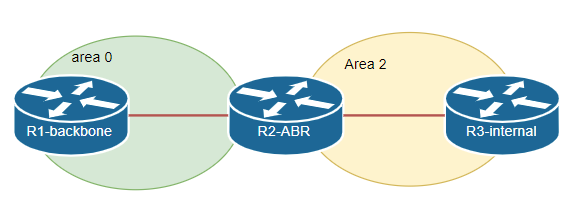
- OSPF基於中央主幹,所有其他區域都附屬於它
- OSPF邊界位於區域中
- 在OSPF中ABR會被算在此區域內
-
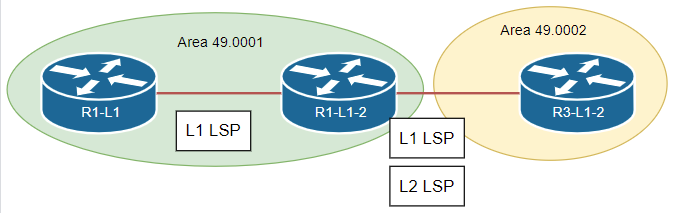
IS-IS area
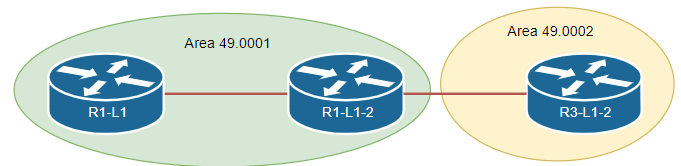
- IS-IS 區域邊界位於鏈路上
- 每個 IS-IS 路由器恰好屬於一個區域
link-state狀態的差別
-
OSPF LSA
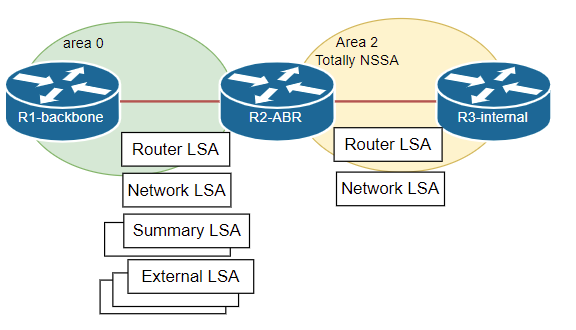
-
IS-IS LSP
OSPF有優勢於IS-IS
- OSPF有很多種area type : normal,stub,NSSA
- 預設使用bandwidth計算metric (IS-IS預設是10)
- OSPF支援種東西
IS-IS link-state Operation
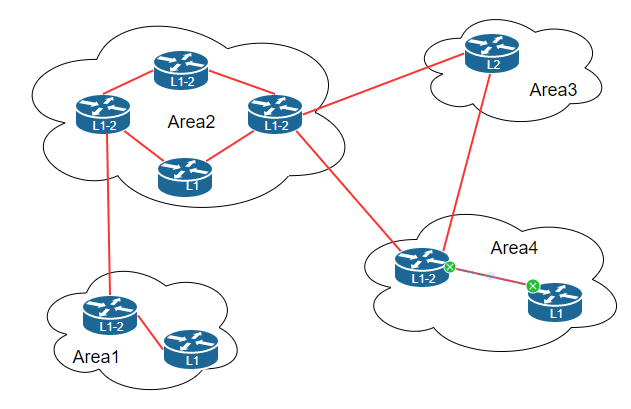
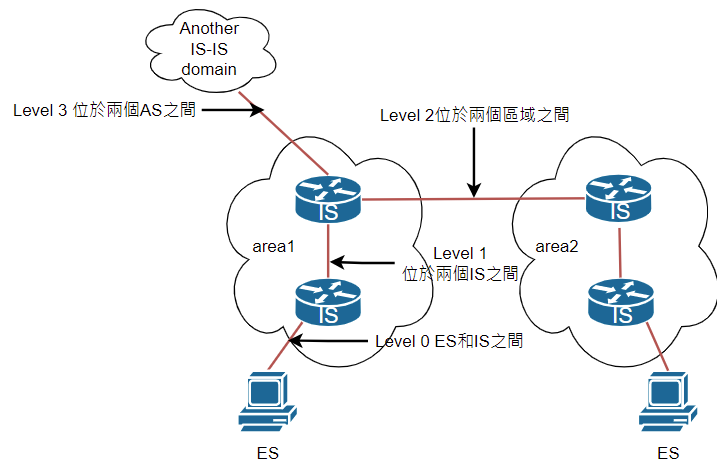
IS-IS Routing Levels
Router 定義 Level 1,Level2或是Level 1-2
- level1 routers 使用LSP為本地建構topology
- 類似於 OSPF internal nonbackbone router
- L1 router會預設把route指向Level1-2,也就會有一條default route指向最低metric的L1-2 route,運作原理就是LSP內部會有一個ATT字段,會指向最低metric的L1-2 route,但是產生default route需要一些條件
- L1-2 route需要連接多個區域
- 一定是連接區域的一定是L1-2 route
- level2 routers 使用LSP建立topology在兩個不同的區域之間
- 類似於 OSPF router nonbackbone router
- level1-2 routers充當level1和level2的邊界路由
- 類似於 OSPF ABR router
command
-
改變level
R3(config-router)#is-type <level-2-only | level-1-2 | level-2-only> -
在單個interface改變level
R3(config-if)#isis circuit-type <level-1 | level-1-2 | level-2-only>
IS-IS metric
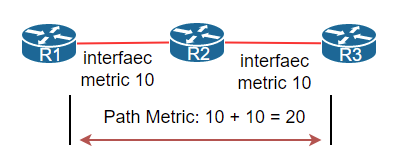
- 預設narrow metric,所有的interface都是10,一個介面最多是6bit也就是0
63,一個路徑的metric 最大是10bit也就是01023 - 在Cisco IOS在12.0之後支持wide metrics,一個介面最多到224次方,一個路徑的metric最大是232
command
-
修改metric
Router(config-router)#isis metric <1-63> [ level-1 | level-2 ] 預設是level-1-2都更改
IS-IS PDUs
- IS-IS PDUs 是直接封裝在數據鏈路層,沒有IP頭部也沒有CLNP
HELLO (ESH、ISH、IIH)
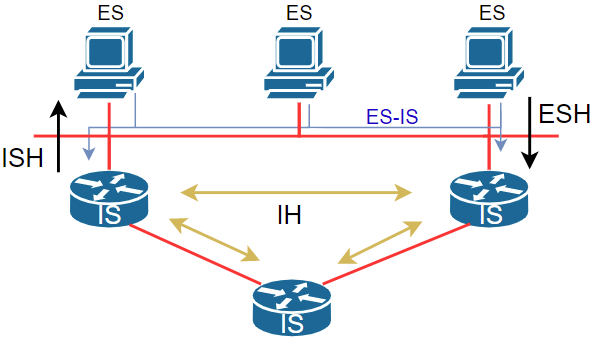
- ES-IS adjacencies位於ESs和router(ISs)之間
- IP系統不使用ES-IS
- ESs 發送 ESHs 以向 IS 宣布它們的存在
- ISs 發送 ISHs 以向 ESs 宣布它們的存在
- ISs 發送IIH到其他ISs
LSP
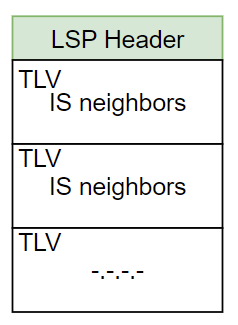
PSNP (parial sequence number PDU)
- 類似於OSPF LSR或是ACK的封包
CSNP (complete sequence number PDU)
- 類似於DBD封包
IS-IS NSAP address structure
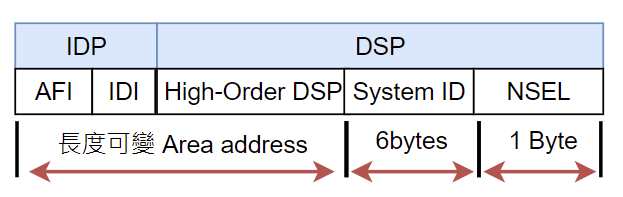
- NSAP : 49.0001.0001.0001.0001.00
- NSAP 最小 8 Byte 最大 20 Byte
- Area address 最少1 Byte最多13 Byte
- IDP (Initial Domain Part):
| 名稱 | 用途 | 範例 | 長度 |
|---|---|---|---|
| AFI(Authority Format ID) | 類似於ASN | 49(私有的)做實驗可以使用 | 1 byte |
| IDI(Intial Domain) | 子區域 | 47.0005 47.0006 | 長度可變 |
- DSP (Domain Sepcific Part):
| 名稱 | 用途 | 範例 | 長度 |
|---|---|---|---|
| HODSP | Area address | 長度可變 | |
| System ID | 類似於OSPF的Router-id | 可以用mac address 可以使用public IP 202.1.3.10 → 202.001.003.010 → 2020.0100.3010 | 6 bytes |
| NASP-Selector | (0x00) | 1 Byte |
定義 IS-IS area address規範
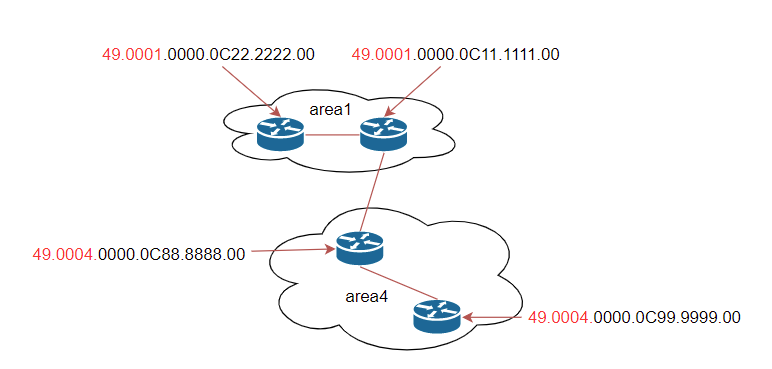
- 一定要以2Byte開頭2Byte結束 example : 49 對 00
- 區域相同area address要相同
OSI addressing : NET(Network entity title) address
- NSAP address 包含NSEL 字段 (process or port number)
- NET : NSAP address 的 NSEL為0就等於NET address
- 指設備本身(相當於設備的第3層OSI地址 )
- 用於路由器,因為它們僅實現網絡層(SPF 計算的基礎)
command
- setting
-
開啟is-is
R1(config)#router is-is [WORD] -
定義NET address
R1(config-router)#net xx.xxxx.xxxx.xxxx.xxxx.xx -
interface上啟用is-is
R1(config-if)#ip router isis [WORD]
-
Subnetwork Point of attachment (SNPA) and circuit ID
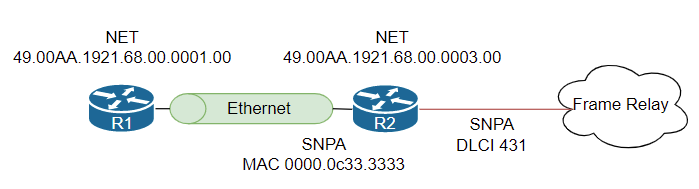
- SNPA用來表示二層的標示
- Ethernet是用 MAC address
- Serial 是用 HDLC
- Frame Relay 是用 DLCI
- Circuit ID
- 在P2P interface上,使用SNAP
- 用來表示interface的編號使用System ID(6Byte) + ID(2Byte) (Example : 1921.16800.0001.01)
IS-IS Routing login
- level 1 router : 對於目的地位址,比較目的地area address和自己的area是否相同
- 如果不一樣就需要把packet傳送給metric最小的level 1-2 router
- 如果相同level 1 database就可以找到運用system ID
- leve 1-2 router : 對於目的地位址,比較目的地area address和自己的area是否相同
- 如果不相同,就用level 2 database查找area address
- 如果相同,就用level1 database找到system ID
Basic example
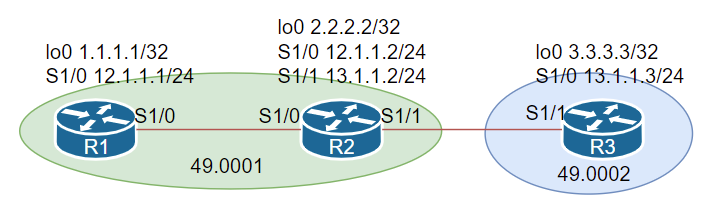
R1(config)#int l0
R1(config-if)#ip addr 1.1.1.1 255.255.255.255
R1(config-if)#no sh
R1(config-if)#ip router isis [process name]
!
R1(config)#int s1/0
R1(config-if)#ip addr 12.1.1.1 255.255.255.0
R1(config-if)#no sh
R1(config-if)#ip router isis [process name]
!
R1(config)#router isis [process name]
R1(config)#net 49.0001.1111.1111.1111.00
R2(config)#int l0
R2(config-if)#ip addr 2.2.2.2 255.255.255.255
R2(config-if)#no sh
R2(config-if)#ip router isis [process name]
!
R2(config)#int s1/0
R2(config-if)#ip addr 12.1.1.2 255.255.255.0
R2(config-if)#no sh
R2(config-if)#ip router isis [process name]
!
R2(config)#int s1/1
R2(config-if)#ip addr 13.1.1.2 255.255.255.0
R2(config-if)#no sh
R2(config-if)#ip router isis [process name]
!
R2(config)#router isis [process name]
R2(config)#net 49.0001.2222.2222.2222.00
R3(config)#int l0
R3(config-if)#ip addr 3.3.3.3 255.255.255.255
R3(config-if)#no sh
R3(config-if)#ip router isis [process name]
!
R3(config)#int s1/0
R3(config-if)#ip addr 13.1.1.3 255.255.255.0
R3(config-if)#no sh
R3(config-if)#ip router isis [process name]
!
R3(config)#router isis [process name]
R3(config)#net 49.0001.3333.3333.3333.00
其他
-
可以使用這行指令,讓建立鄰居的時候會顯示log訊息在畫面上建議使用
R1(config-router)#log-adjacency-changes all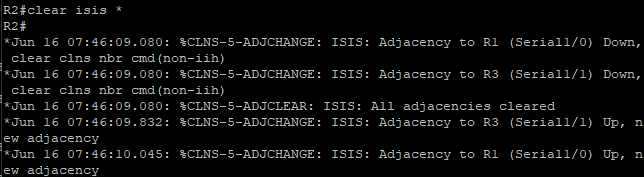
-
清除鄰居
R1#clear clns neighborsR1#clear isis *
SHOW
-
查看鄰居
R2#show clns neighbors
R2#show clns is-neighbors
R2#show isis neighbors
-
system ID
R2#show isis hostname
-
查看interface
R2#show clns interface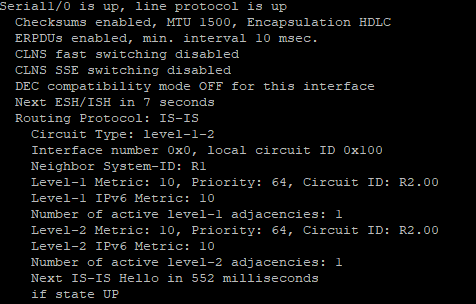
-
路由表
R1#show ip route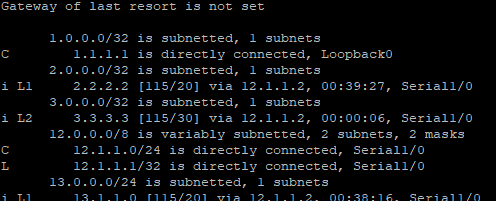
優化
-
因為預設R1和R2還有R3都是Level1-2 router,但是不需要,R1只需要Level1的功能,R2需要Level1-2,但是R3需要L2的功能
R1(config-router)#is-type level-1R2(config-router)#is-type level-1-2R3(config-router)#is-type level-2-only- show
-
現在R2跟R1只有L1的鄰居,R2跟R3只有L2的鄰居

-
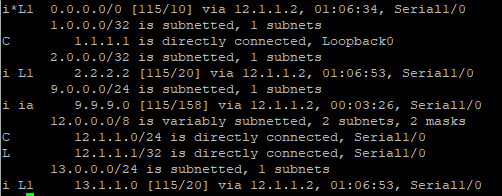
在R1上就會發現default route往s1/0送,L1 router會預設把route指向Level1-2
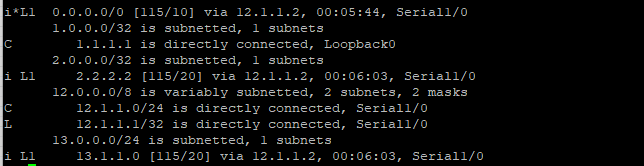
-
- show
Route Leaking
-
如果今天訪問WWW和FTP這兩台server想單獨R3的流量,R2走其他的流量,可以先把R1到R2的主機metric調整的比R1到R3的低,然後在R4上面運用Route Leaking將將FTP和WWW的路由資訊洩漏給R3
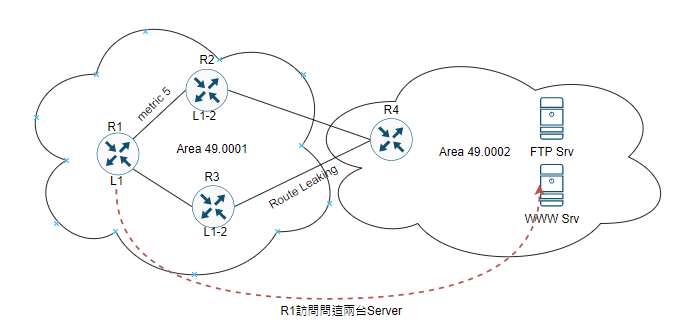
Example
-
將9.9.9.9洩漏給R1
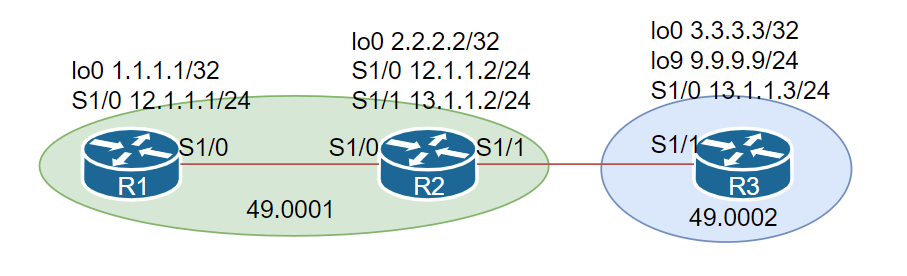
R2(config-router)#redistribute isis ip level-2 into level-1 distribute-list 100 R2(config)#access-list 100 permi上 -
在R1上就會有這9.9.9.0的路由