OSPFv2 與 OSPFv3 全面整理:原理、流程、LSA 類型與實作案例
OSPFv2 與 OSPFv3 全面整理:原理、流程、LSA 類型與實作案例的重點整理。
OSPFv2
OSPF概念
- OSPF 基礎
- (Open Shortest Path First,開放最點路徑優先)是一種鏈路狀態路由協定,無路由循環(全局topology),屬於IGP。RFC2328,”開放”意味著是公開的協定。
- OSPF的封裝
- OSPF協議封裝於IP,協議版本號89。
- OSPF協議使用組播地址
- 所有OSPF路由器 224.0.0.5; DR BDR 224.0.0.6 。
- OSPF路由協議的管理距離:110
- OSPF支持IP、VLSM、CIDR、只能手動用路由彙總功能
OSPF流程
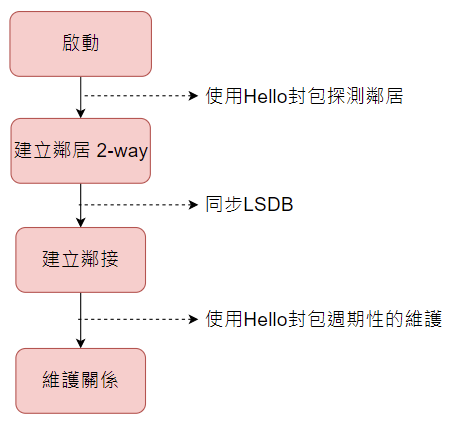
- 建立鄰居關西(Establish router adjacencies)
- OSPF建立鄰居關西必須是同網段
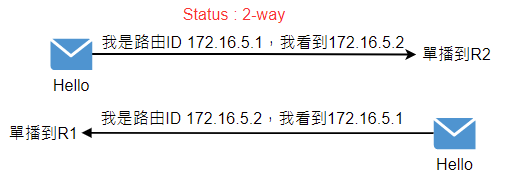
- 2-way,雙方都收到了對方發的OSPF 封包而已ospf DR之間的鄰居關係就是2-way
- 鄰接關西必要的時候進行DR的選舉(Elect the DR/BDR)
- 發現路由(Discover routes)
- 選擇適合的路由器(Select appropriate routes)
- 維護路由訊息(Maintain routing information)
OSPF table
鄰居表(neighbor table):
-
OSPF用鄰居機制來發現和維持路由的存在,鄰居表處存了雙向通信的鄰居關西
Router#show ip ospf neighbor
拓撲表(topology table):
-
OSPF用LSA(link state Advertisement鏈路狀態通告)來描述網路拓撲訊息,然後OSPF路由器用拓撲數據庫存儲網路的LSA,其實就是LSDB。
Router#show ip ospf database
OSPF路由表(routing table):
-
對鏈路狀態數據庫進行SPF(Dijkstra)計算,而得出的OSPF路由表
Router#show ip route ospf
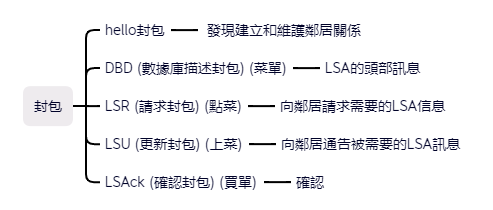
OSPF packet type

-
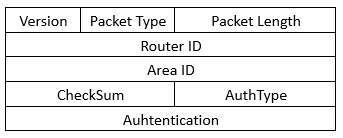
OSPF公用封包header
-
Version
IPv4 = 2
IPv6 = 3
-
Packet Type
- Hello封包 建立換維護OSPF鄰居關係 Packet Type=1
- DBD/DD封包 鏈路狀態數據庫描述訊息(描述LSDB中LSA頭部訊息) Packet Type=2
- LSR封包 鏈路狀態請求,向OSPF鄰居請鏈路狀態訊息 Packet Type=3
- LSU封包 鏈路狀態跟新(包含一條或多條LSA) Packet Type=4
- LSAck封包 對LSU重的LSA進行確認 Packet Type=5
-
AuthType
不認證 = 0
明文認證 = 1
MD5 = 2
-
OSPF area
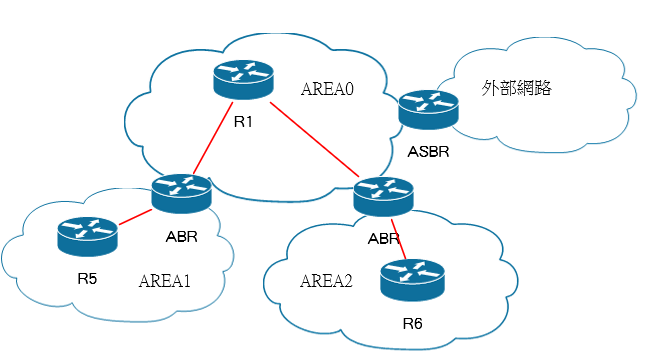
區域的用意
- 每個區域只用一個LSDB
- LSDB太大了,會占用路由器的memory
- 沒有分Area消耗太多的CPU資源
- 協議封包太大會佔網路頻寬
- 減少了LSA洪的範圍,有效把拓撲的變化控制在區域內,提高網路的穩定性 (網路震盪的問題)
- 拓撲的變化引響可以只限制涉及本區域
- 多區域提高了網路的擴展性,有利於組建大規模網路
區域的專業用語和路由類型
OSPF區域劃分是以接口劃分
- ABR : 區域邊界路由器
- 一個路由器指少有兩個接口屬於不同的區域
- ASBR : 自治系統邊界路由
- 一個路由器至少又一個接口屬於OSPF,此如靜態路由,eigrp,bgp等等
- IR : R5、R6 內部路由器
- BR : R1 骨幹路由器 Area0是骨幹區域
OSPF的區域設計的注意事項
- 所有非骨幹區域都必須直連到area0。
- 如果出現非直連到area0區域的情況,要使用virtual-link虛擬鏈路互連。
- 每個區域和area0互連的時候,只要要有一個ABR,建議多ABR,多備份出口。
- 所有區域之間互訪問,流量必須穿越area0
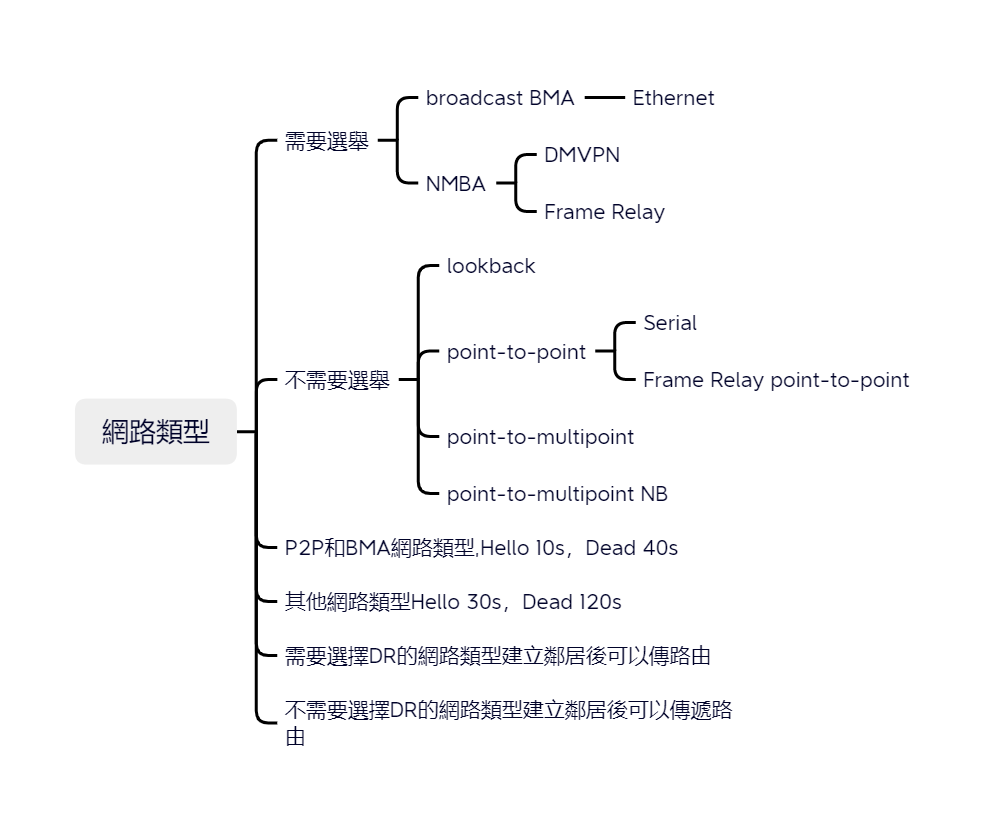
OSPF network type
Lookback
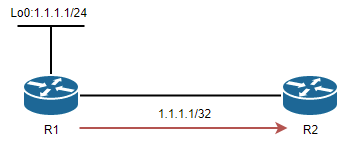
- 環迴口在OSPF是一種單獨的網路類型
- 環迴口下配置的IP,不管遮罩式多少,發出的路由都是/32位的主機路由
P2P (CISCO)
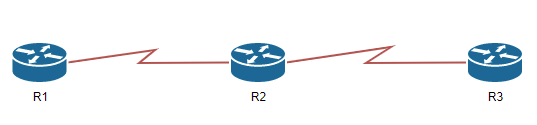
- 如果第二層協議為PPP,HDLC,或是tunnel,則OSPF網路類型為P2P
- 如果Frame Relay接口類型為P2P的,則OSPF網路類型也為P2P
- 不選舉DR BDR
- 使用組播224.0.0.5
- OSPF能夠根據第二層封裝自動檢測到P2P網路類型
| 特徵 | 是否選舉DR/BDR | hello interval | dead interval |
|---|---|---|---|
| PPP,T1,DS-3等等 | N | 10 | 40 |
- 修改dead不會引響hello時間,但是修改hello時間會引響dead時間
tips : Serial0/0
Broadcast MA (CISCO)
- 選舉DR,BDR
- 通常出現在Ethernet
- 所以路由器均與DR級BDR建立鄰接關係
- 使用組播地址224.0.0.5和224.0.0.6
| 特徵 | 是否選舉DR/BDR | hello interval | dead interval |
|---|---|---|---|
| Ethernet, Token Ring,FDDI | Y | 10 | 40 |
- 修改dead不會引響hello時間,但是修改hello時間會引響dead時間
NBMA (RFC)
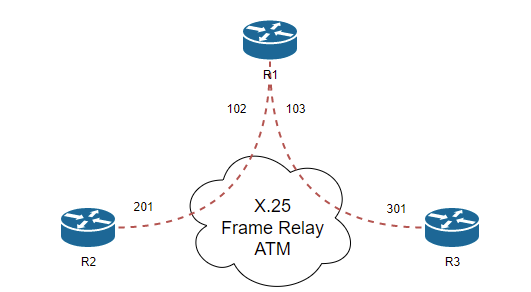
- 使用物理接口預設為NBMA
- 使用子接口預設為點對點
- 使用NBMA需要使用neighbor指定鄰居
| 特徵 | 是否選舉DR/BDR | hello interval | dead interval |
|---|---|---|---|
| Frame-relay x.25 | Y | 30 | 120 |
-
不具有廣播的能力,所以鄰居需要手動直指定,封包傳遞方式是以單撥方式傳遞
-
NBMA調整hello時間較長,建立鄰居太慢了,所以可以利用下面指令更快
-
修改dead不會引響hello時間,但是修改hello時間會引響dead時間
Router(config-if)#ip ospf dead-interval minimal hello-multiplier 20
P2mP (RFC)
| 特徵 | 是否選舉DR/BDR | hello interval | dead interval |
|---|---|---|---|
| frame relay | N | 30 | 120 |
- 是一種以P2P擴展的網路類型,所以不會選舉DR、BDR
- 是以netmask 255.255.255.255路由發送
- 修改dead不會引響hello時間,但是修改hello時間會引響dead時間
p2mp nbma (CISCO)
| 特徵 | 是否選舉DR/BDR | hello interval | dead interval |
|---|---|---|---|
| frame relay | N |
- NBMA的一個特殊配置OSPF數據以單播的方式發送
OSPF interface type
- p2p
- P2mP NB
- NBMA
- BMA
| 不同類的OSPF | 能否建立鄰接(hello dead時間不同)能否傳遞路由 | 能否建立鄰接(hello dead時間相同)能否傳遞路由 |
|---|---|---|
| BMA↔NBMA | 不能建立鄰接(時間不同) | 可以建立鄰接,也可以傳遞路由訊息 |
| BMA↔P2mP | 不能建立鄰接(時間不同) | 可以建立鄰接,但是不能傳遞路由訊息 |
| BMA↔P2P | 預設時間一樣不討論 | 可以建立鄰接,但是不能傳遞路由訊息 |
| NBMA↔P2mP | 不能建立鄰接(時間不同) | 可以建立鄰接,但是不能傳遞路由訊息 |
| NBMA↔P2P | 不能建立鄰接(時間不同) | 可以建立鄰接,但是不能傳遞路由訊息 |
| P2mP↔P2P | 不能建立鄰接(時間不同) | 可以建立鄰接,也可以傳遞路由訊息 |
Command
-
查看網路類型
R1#sh ip ospf int e0/0 Ethernet0/0 is up, line protocol is up Internet Address 12.1.1.1/24, Area 0, Attached via Network Statement Process ID 1, Router ID 12.1.1.1, Network Type BROADCAST, Cost: 10 Topology-MTID Cost Disabled Shutdown Topology Name 0 10 no no Base Transmit Delay is 1 sec, State DR, Priority 1 Designated Router (ID) 12.1.1.1, Interface address 12.1.1.1 Backup Designated router (ID) 12.1.1.2, Interface address 12.1.1.2 Timer intervals configured, Hello 10, Dead 40, Wait 40, Retransmit 5 oob-resync timeout 40 Hello due in 00:00:05 Supports Link-local Signaling (LLS) Cisco NSF helper support enabled IETF NSF helper support enabled Index 1/1, flood queue length 0 Next 0x0(0)/0x0(0) Last flood scan length is 0, maximum is 1 Last flood scan time is 0 msec, maximum is 0 msec Neighbor Count is 1, Adjacent neighbor count is 1 Adjacent with neighbor 12.1.1.2 (Backup Designated Router) Suppress hello for 0 neighbor(s) -
更改網路類型
R1(config-if)#ip ospf network ?

  broadcast            Specify OSPF broadcast multi-access network
  non-broadcast        Specify OSPF NBMA network
  point-to-multipoint  Specify OSPF point-to-multipoint network
  point-to-point       Specify OSPF point-to-point network
OSPF網路的接口類型的總結
| Network type | hello interval | dead interval |
|---|---|---|
| P2P和BMA | 10 | 40 |
| other | 30 | 120 |
- 只要是hello-interval和dead-interval時間相同就可以建立鄰接關係
- 只要建立鄰接關係,看有沒有DR\BDR選舉就可以傳遞路由訊息
LSA
什麼是LSA
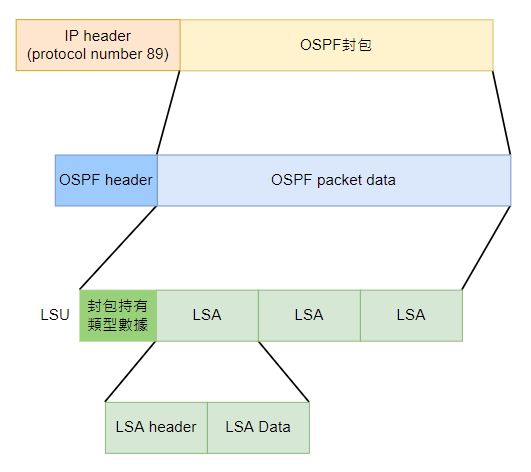
LSA類型
-
產生路由訊息
type 名稱 描述 1 路由器LSA (Route LSA) 區域內Router產生,描述了路由器所有接口,鏈路和Cost。只能在本區域內泛洪。 2 網路LSA (Network LSA) 由DR產生,封包包括了其連接的所有Router的Router ID 3 網路彙總LSA (summary LSA) 可以通知本區域內的路由器通往區域外的路由訊息。默認路由也被通告。link ID為目標網段的ID -
type 1
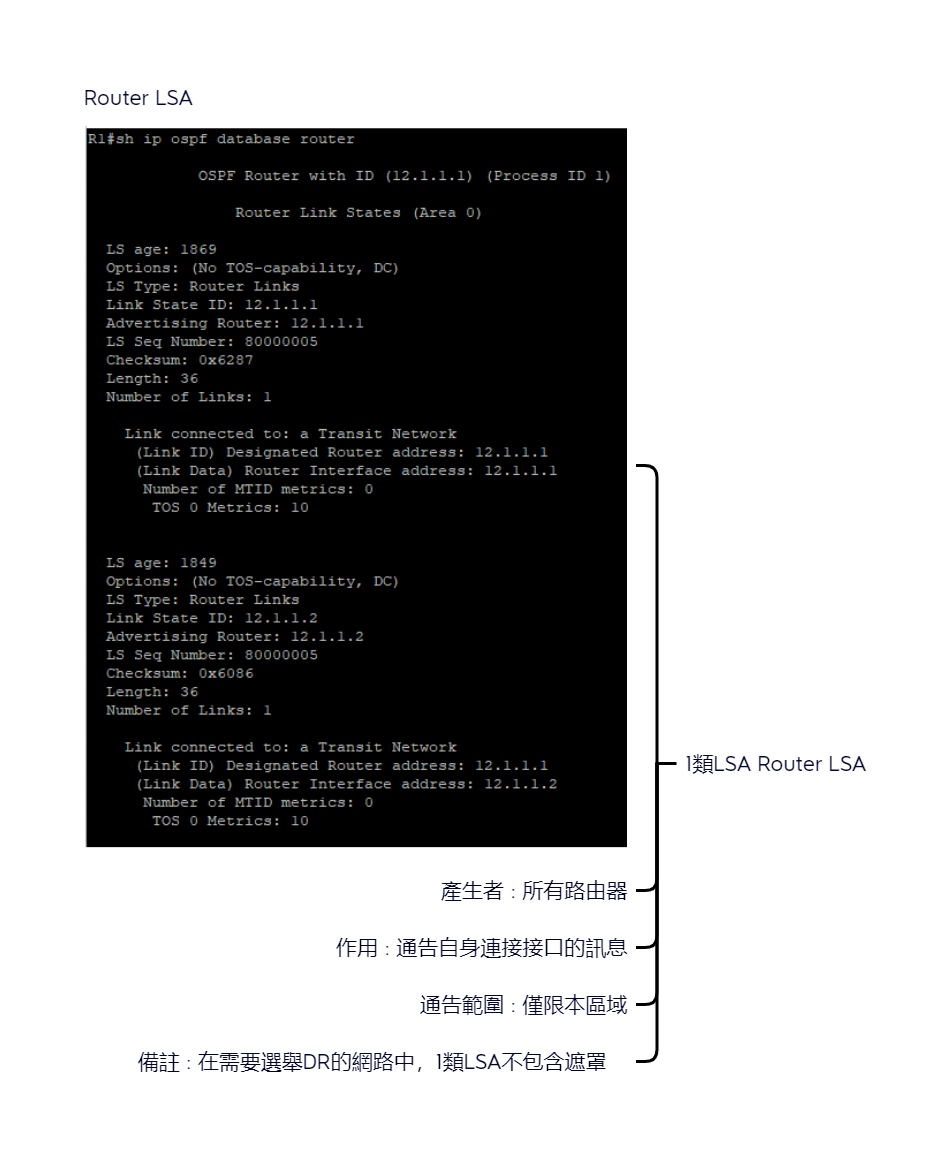
Router#sh ip ospf database router -
type 2
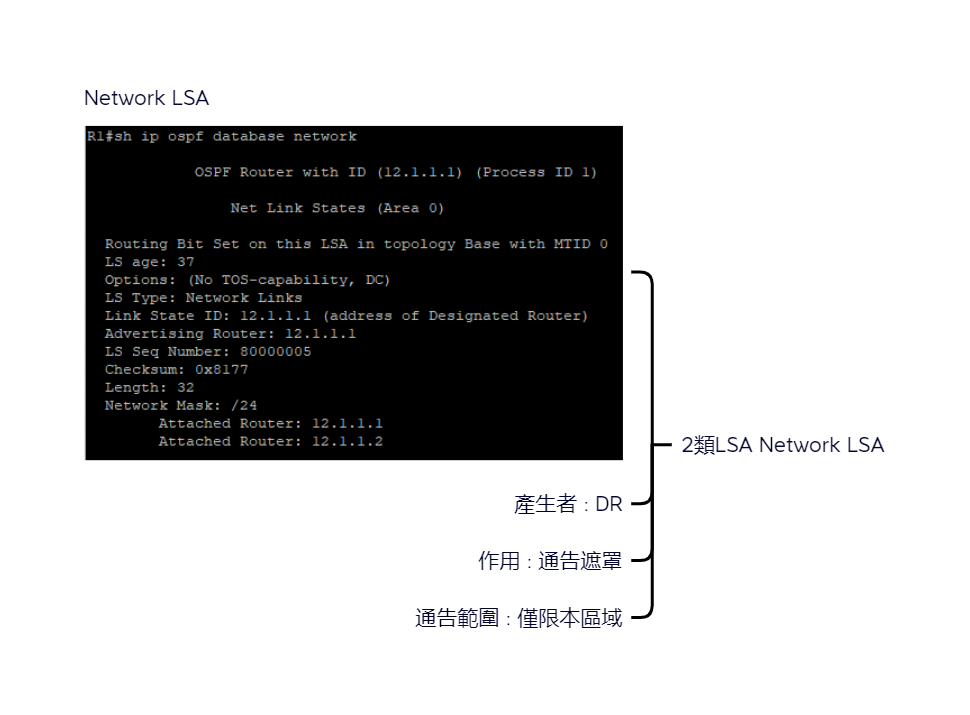
Router#sh ip ospf database network -
type 3
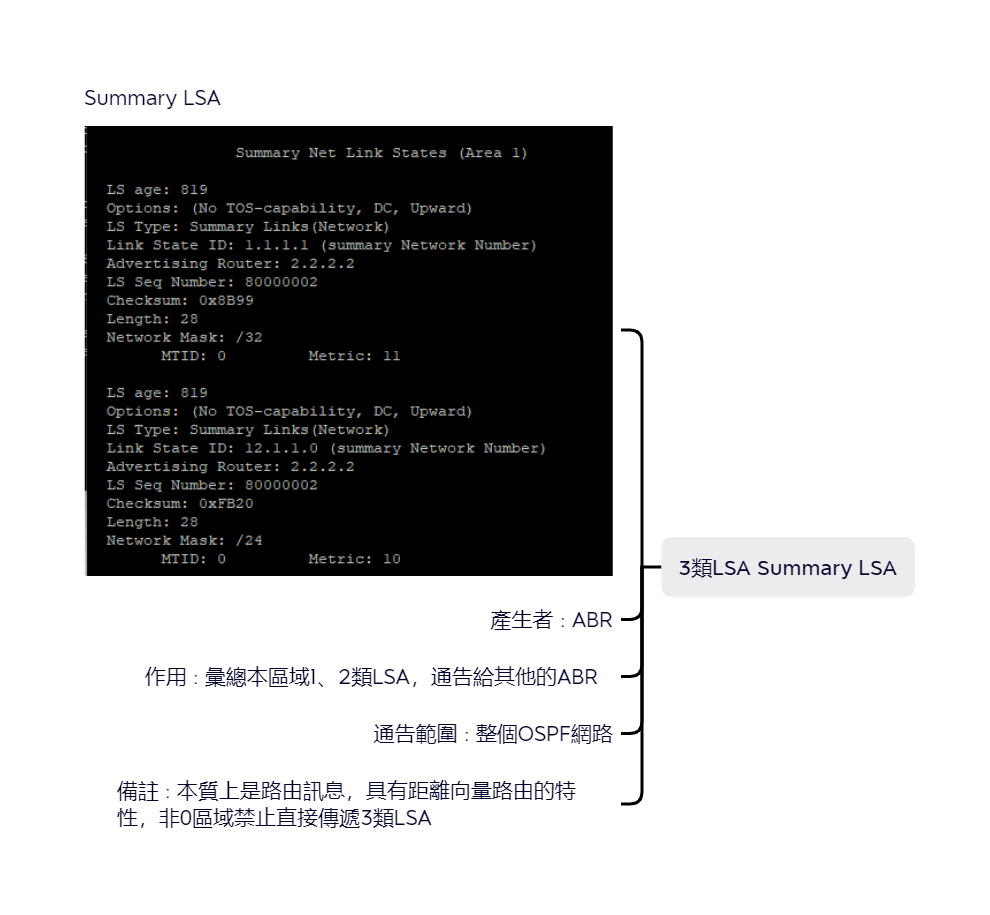
Router#sh ip ospf database summary
LSA Type LSA name mean show ip ospf database LSID 相當於 建立者 1 Router 一台路由器 router 路由器RID 每個路由器會產生 2 Network 存在DR的子網路 network 改子網路中的DR IP DR 3 summary 另一個區域內的子網路 summary 子網路編號 ABR -
-
外部
4 ASBR彙總LSA (ASBR summary LSA) 也是由ABR產生,但是他是一條主機LSA,指向ASBR路由器 5 自治系統外部彙總LSA (Extended LSA) 由ASBR產生,告訴本自治區的路由器通往外部自治區的路徑,本質上就是路由訊息 7 NSSA外部LSA 由ASBR產生,雞戶和LSA5通告是向同的,但是NSSA外部的LSA通告僅僅在開始史送這個NSSA外部LSA通告的分純末梢區域內進行泛洪 -
type 4
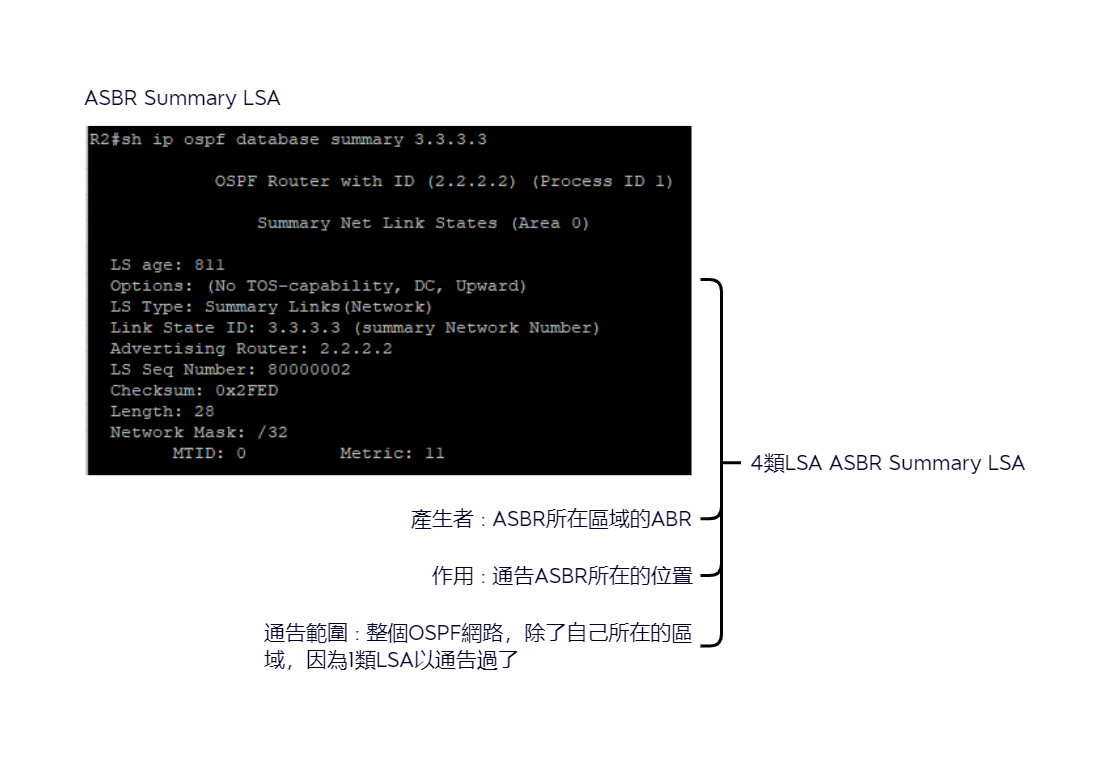
Router#sh ip ospf database summary 3.3.3.3 -
type 5
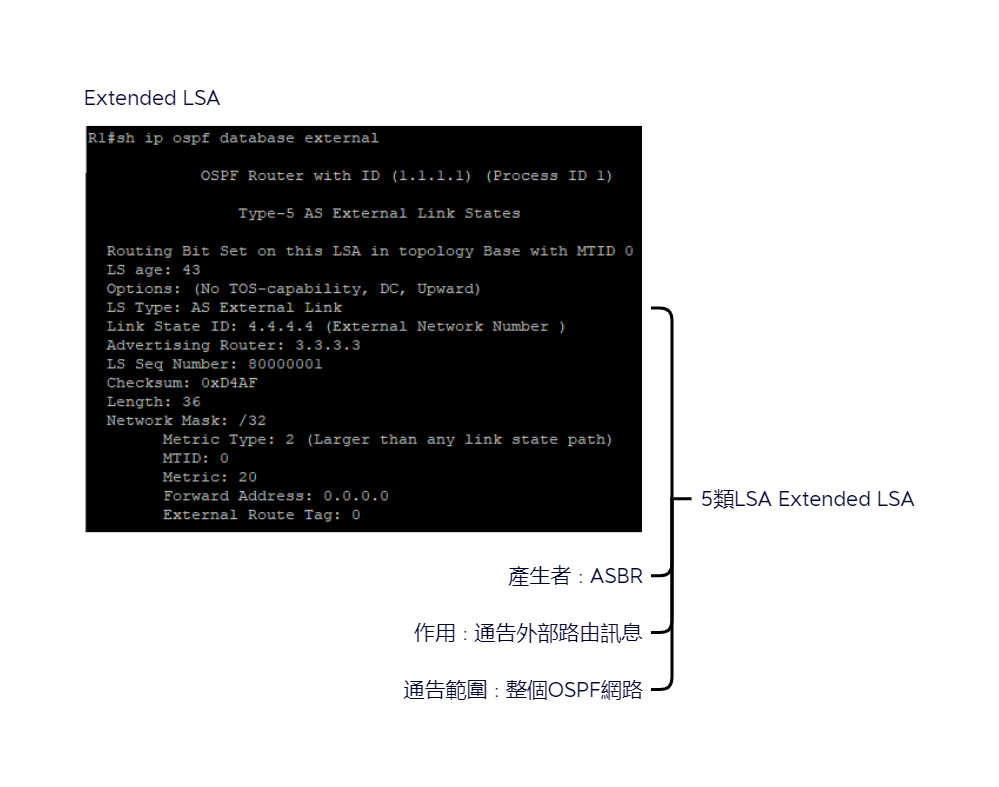
Router#sh ip ospf database external [路由] -
type 7
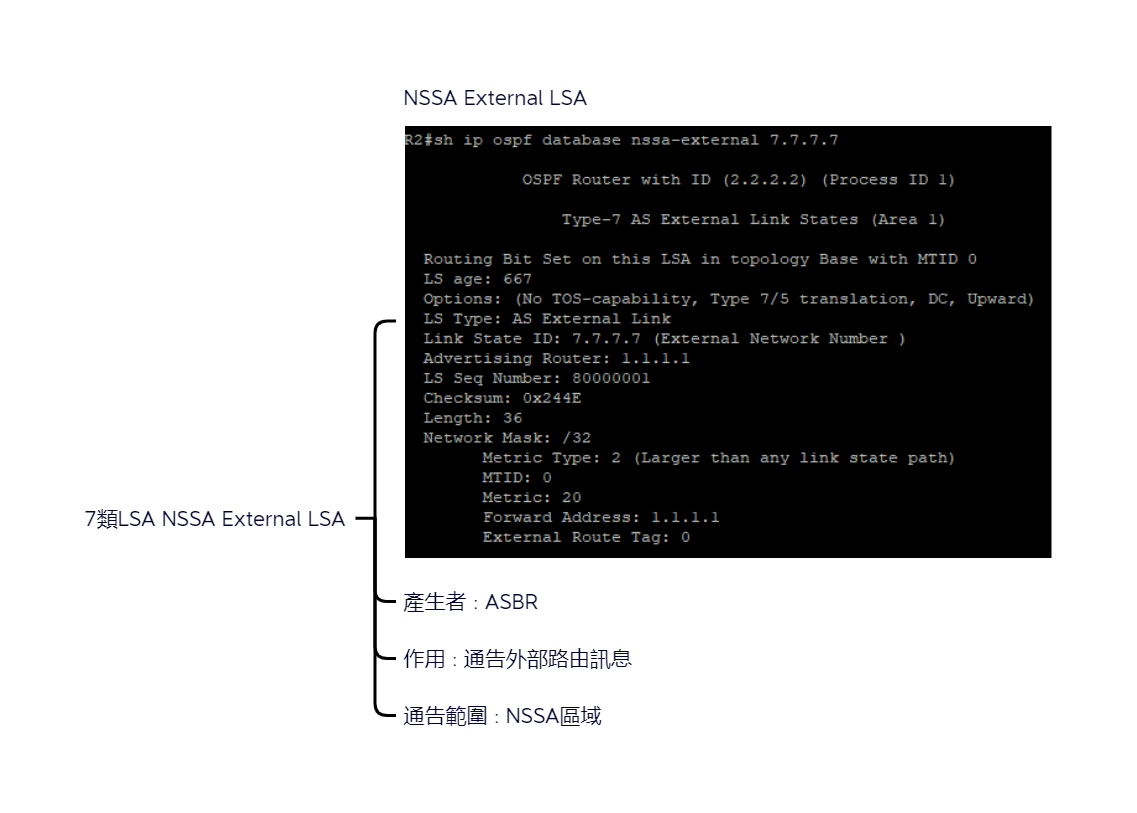
Router#sh ip ospf database nssa-external [路由]
-
-
IPv6
8 Link LSA 9 Intra-Area Prefix LSA -
CCIE
6 MOSPF CCIE階段會學到 (Cisco IOS 不支援)
OSPF基本配置
Basic
-
開啟OSPF程式
Router(config)#router ospf <process-id> example : Router(config)#router ospf 10 -
需告特定的網路到OSPF區域
Router(config-router)#network address wildcard-mask area area-id example: Router(config-router)# network 192.168.10.0 0.0.0.255 area 10 -
接口宣告的方法 大部分IOS 12.3(11)T後才可以用,少許有些版本可以支持
Router(config)#router ospf 2
Router(config-router)#int e0/0
Router(config-if)#ip ospf 2 area 0
show
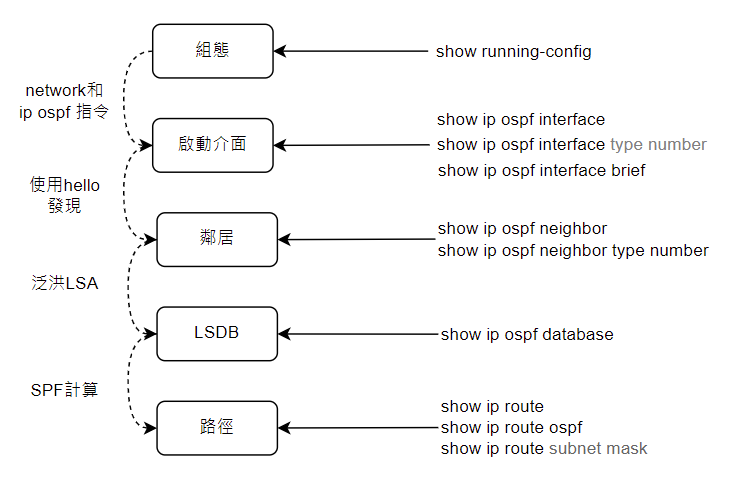
-
查看狀態和鄰居
Router#sh ip ospf neighbor
-
查看DR BDR
Router#sh ip ospf int brief
-
驗證設定的IP路由協議程序,參數和統計訊息
Router#sh ip protocols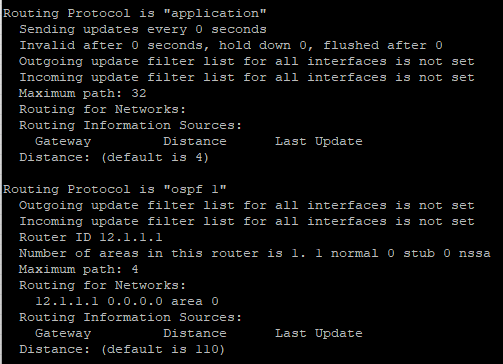
-
顯示路由器學到的所有OSPF路由
Router#sh ip route ospf [process id]
OSPF同步過程
1. 建立鄰居關係
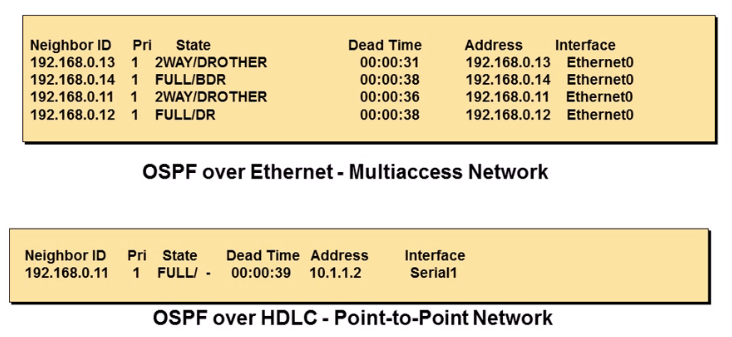
OSPF建立鄰居關係 Hello封包
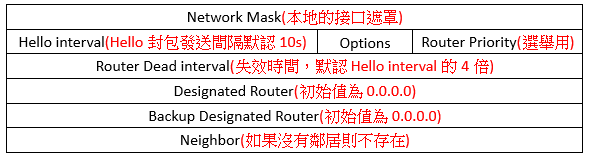
- Hello封包是拿來發現OSPF鄰居並建立相鄰的關係,通過組播位置244.0.0.5發送給ALLSPFRouters
- 通告兩台路由器建立鄰居關係所必須統一的參數
- 在乙太網路和幀中繼網路等多路訪問網路選舉指定路由器(DR)和北用指定路由器(BDR)
-
調整hello interval和dead interval
Router(config-if)#ip ospf hello-interval <time> Router(config-if)#ip ospf dead-interval <time> -
查看OSPF Hello內容
Router#debug ip ospf packet

輸出訊息:
OSPF-1 PAK : rcv. v:2 t:1 l:52 rid:15.15.15.15 aid 0.0.0.3 chk:45CB aut:0 auk: from Ethernet0/0
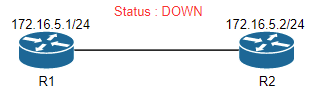
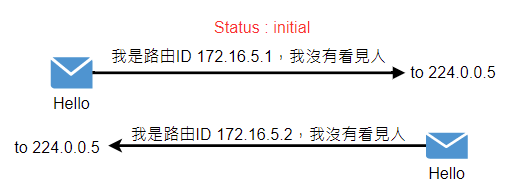
2. 建立鄰居流程
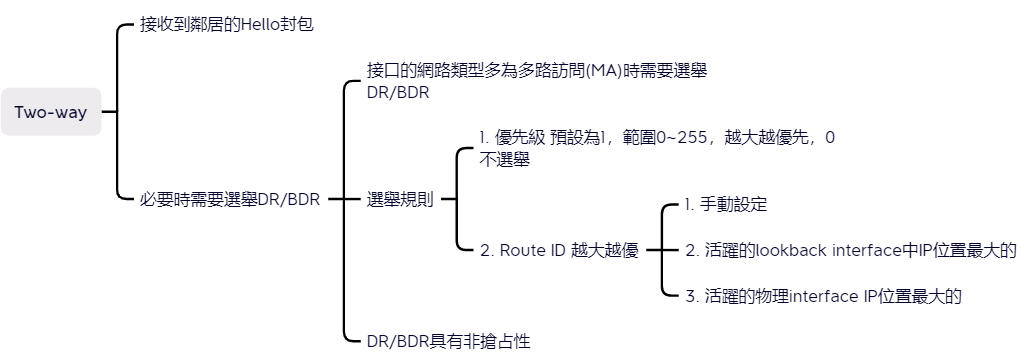
DR BDR選舉
- 沒有選舉的情況
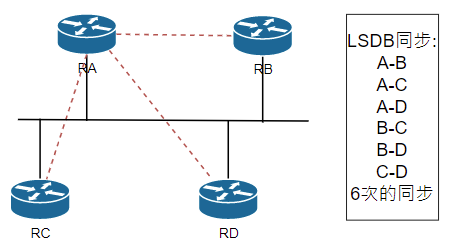
- 有選舉的情況
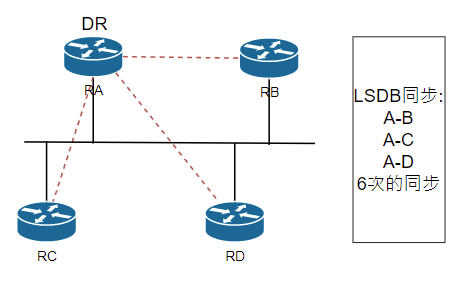
出現原因
- 為了減少多路訪問網路中的OSPF流量,OSPF會選舉出一個指定路由(DR),和一個備用指定路由(BDR)。
- DR的作用 : 多路訪問中為了減少鄰居關西(N指數問題)和LSA的泛洪,採用了DR機制,BDR提供了備份。
角色特性
- MA網路上的路由器都對DR,BDR建立鄰居關係。
- 指定路由器(DR) : DR負責使用該變化訊息更新其他所以有OSPF路由器(DRouter)。
- 備用指定路由器(BDR) : BDR會監控DR的狀態,並在當前DR發生故障時接替其角色。
Router ID
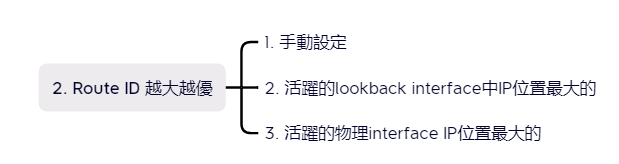
- 用於標示OSPF路由的ID,全網唯一性;可以手動配置,也可以動態選舉(有Lookback接口時,會選擇最高的Lookback IP位置;否則,會選擇最高活躍的物理接口IP位置)
- 建議使用lookback接口設定或式手動配置router-id
OSPF Cost
| 鏈路類型 | 默認cost |
|---|---|
| 64-kb/s serial-link | 1562 |
| T1 (1.544-Mb/s serial-link) | 64 |
| E1 (2.048-Mb/s serial-link) | 48 |
| Ethernet | 10 |
| Fast-Ethernet | 1 |
-
自動計算:參考頻寬(10的8次方)/出口的頻寬
-
接口頻寬為接口邏輯頻寬,可以使用bandwith指令調整,主要用於路由計算,而不是物理頻寬,但應班情況:接口邏輯頻寬=接口物理頻寬
-
手動修改cost
Router(config)# int serial 1 Router(config-if)#ip ospf cost 100 -
可以修改參考值頻寬,來保證OSPF在現今網路正常運作
Router#auto-cost reference-bandwidth <參考頻寬Mbits為單位> -
查看Cost
Router#sh ip ospf interface e0/0 -
更改OSPF路由器priority
R1(config-if)# ip ospf priority <0~255>
選舉規則
-
接口優先級數字越大越好(優先級為0不能餐與DR的選舉) 0-255
-
Router ID越大越好
-
穩定壓倒一切(非搶佔),簡單來說就是選完之後不會再選了,除非下這行指令才會重新建立鄰居關係,並重新選舉DR
Router#clear ip ospf process -
通過控制街口的優先級是控制DR選舉的好辦法
-
DR的選舉是基於接口的,如果說某個路由器是DR,是錯誤的說法
-
最高的接口優先級被作為DR,如果優先級相等(默認為1)
-
具有最高的路由ID(Router)的路由器被選舉為DR,被且DR具有非搶佔性
LSDB sync
3. LSDB確認同步流程
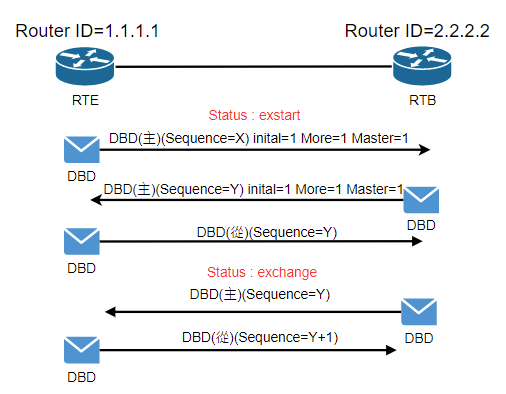
建立完全鄰接關係
4. 建立鄰接關係開始同步流程
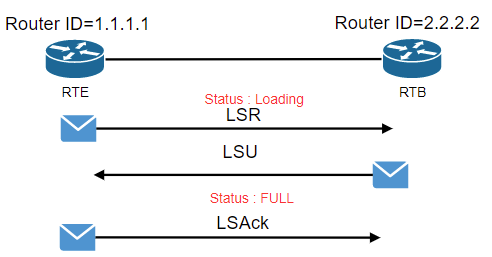
-
查看鄰接關西
Router#debug ip ospf adj
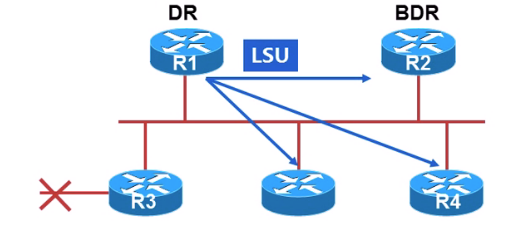
LSA的泛洪
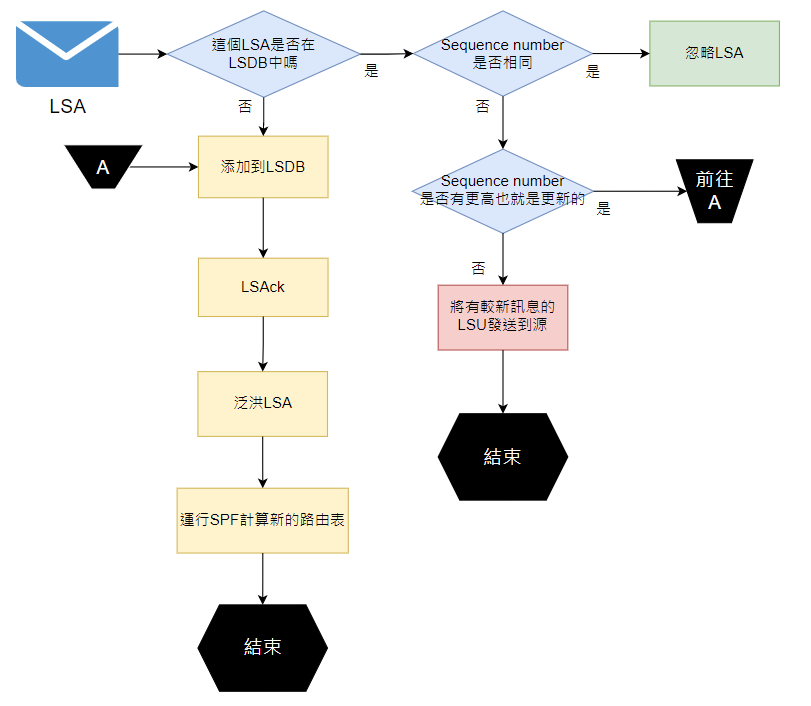
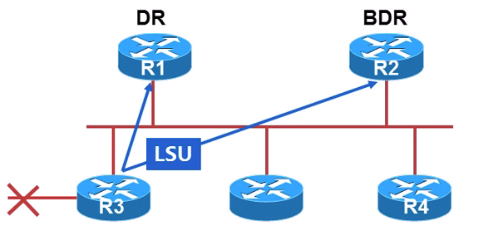
- 路由器R3用224.0.0.6通知DR路由器和BDR路由器
-
DR、BDR監聽224.0.0.6這個一組播位置
-
DR利用組播地址224.0.0.5通知其他路由器
-
所有的OSPF路由器監聽224.0.0.5這個組播位置’
-
定義新的LSA
OSPF預設LSA最大生存時間3600秒=1hr
OSPF預設每隔1800秒=30分鐘,要強制刷新一次OSPF LSA給鄰居
一條路由生存時間是20秒,一條路由生存時間是50秒,20秒算新的LSA
- 較高的sequence number
- 較高的check sum
- 生存時間等於最大生存時間(毒化)
- 叫段的鏈路生存時間(LSA生存時間較短)
-
LSA sequence number
如果端口up to down 1次,LSA seqence number就+1,如果沒有up to down,那麼就每隔30min強制刷新,60min會歸零!
- 4個byte的數字
- 以0x80000001開始;以0x7FFFFFFF結束
- OSPF每30min泛洪一次LSA
- 每一次,sequence number遞增1
- 具有更高Seqence number的LSA是最新的LSA
- 最後,Seqence number會回到0x80000001
- 現有LSA的生存師時間提前到最大生命時間(一個小時),並且已刷新
可以從
Router#sh ip ospf database
如何查看ospf database:
link ID : 目的地網段(路由)
ADV router : 宣告這個網段的路由源位置(router-id)
如果router-id不可達,會導致該路由器攜帶的其他OSPF網段都不可達
Age : 生存時間1183秒,最近一次更新是1183秒
seq : 序列號,每次新序列號都要+1
checksum : checksum
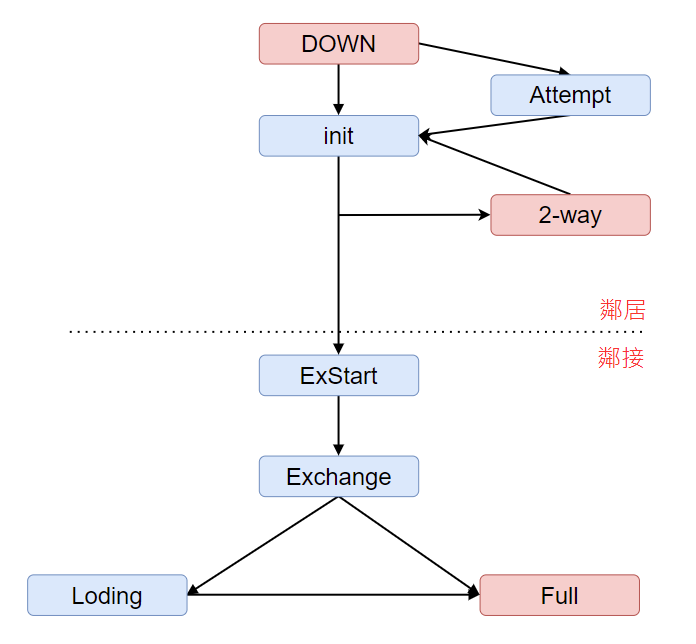
各種狀態
-
DOWN : 為檢測活動的鄰居
-
INIT : 收到Hello封包
-
2-way : 擁有所收Hello數據包中的路由ID (鄰居關係)
-
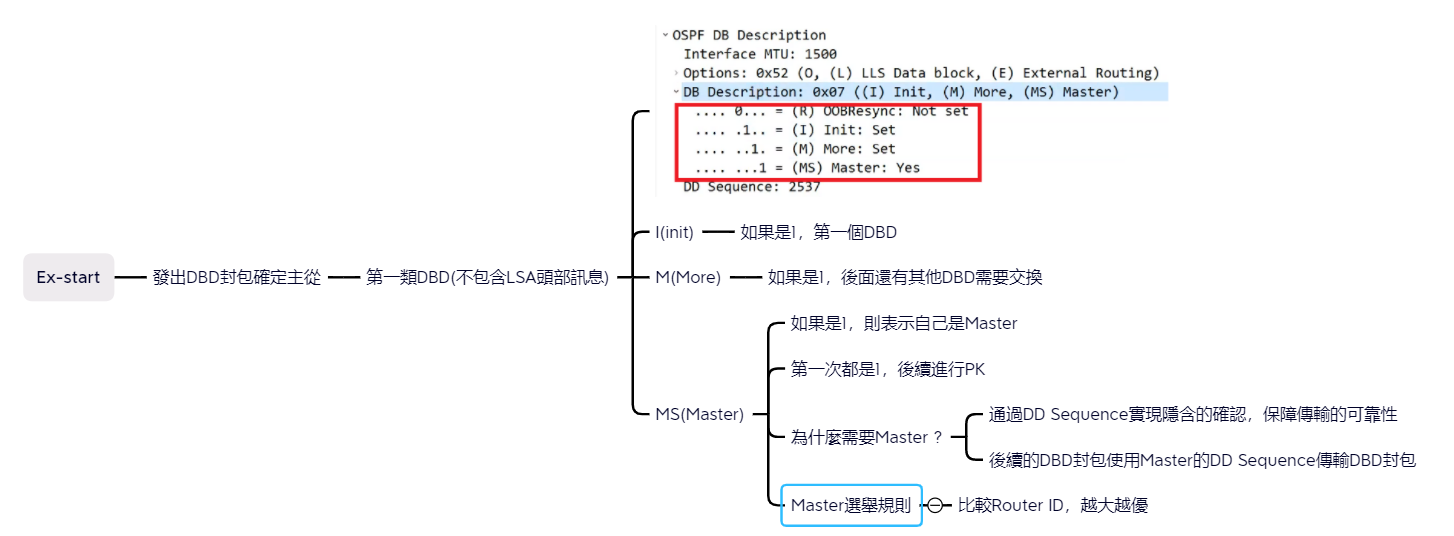
Exstart : 確定主從關係角色
-
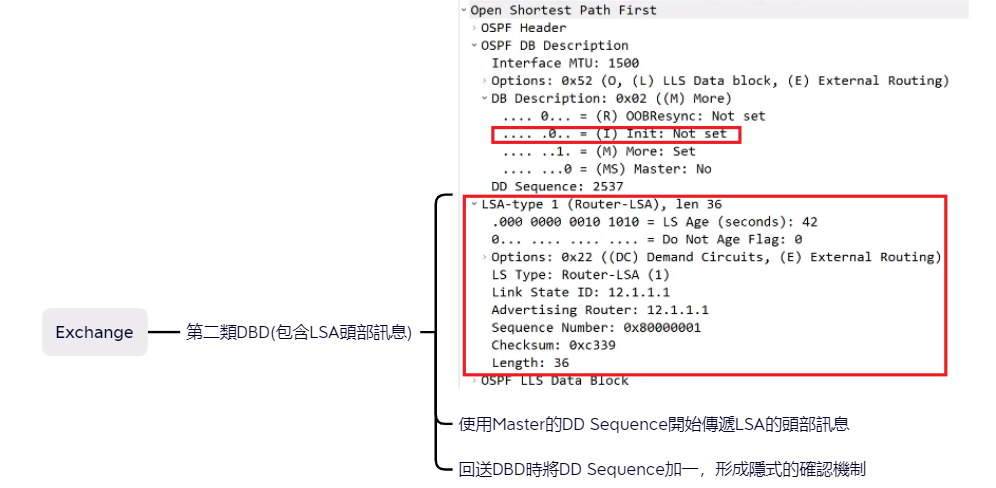
Exchange : 發送DBD
-
Loading : LSR和LSU瘋狂交換中
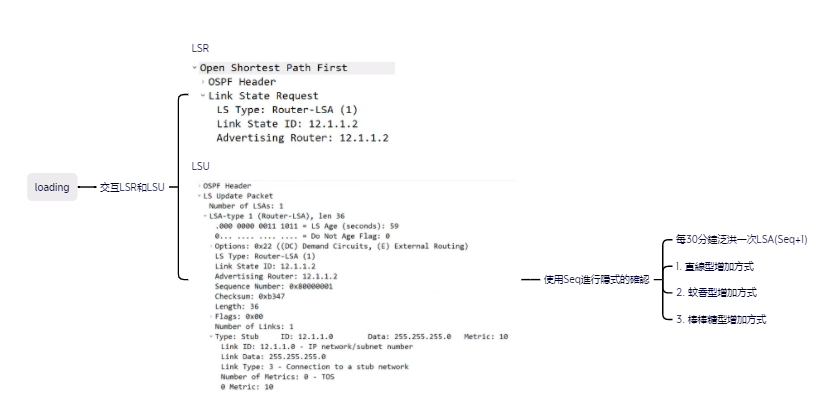
-
Full鄰居完全鄰接 (鄰接關係LSDB同步完成)
鄰居無法建立常見的問題
- hello interval不同或是dead interval不同
- area ID不一樣
- 特殊區域(如stub,nssa等)區域類型不一樣
- 認證類型或是密碼不一樣
- 路由ID相同
- Hello被ACL deny
- 鏈路上的MTU不一樣
- 接口OSPF網路類型不一樣
鄰接關係鄰居關係差別
- 只要是鄰接關係一定是鄰居關係,反之鄰居關係不一定是鄰接關係
- 其實只要看有沒有同步LSDB就可以判斷出哪個是鄰接關係哪個是鄰居關係了
OSPF認證
明文
-
接口認證
Router(config-if)#ip ospf authentication-key password Router(config-if)#ip ospf authentication -
區域認證
Router(config-if)#ip ospf authentication-key password
Router(config-router)#area area-id authentication
MD5
-
接口認證
Router(config-if)#ip ospf message-digest-key key-id md5 key Router(config-if)#ip ospf authentication message-digest -
區域認證
Router(config-if)#ip ospf message-digest-key key-id md5 key
Router(config-router)#area 0 authentication message-digest
路徑篩選
Type 3 LSA filter
- ABR1上過濾network 3 的通告
- ABR2 上過濾network2 and network3這
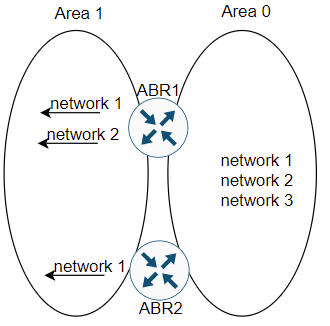
這樣的目的是為了避免area 1所有使用者的封包到達network 3,但允許netowrk 2只能透過ABR1通過,可以設定在router ospf下設定area number filter-list prefix name {in | out},filter type 3 LSA
- 當設定為in,IOS filter的建立並flooding到設定區域裡的prefix
- 當設定為out,IOS filter的是從設定區域離開的prefix
command
area number filter-list prefix name {in | out}
case
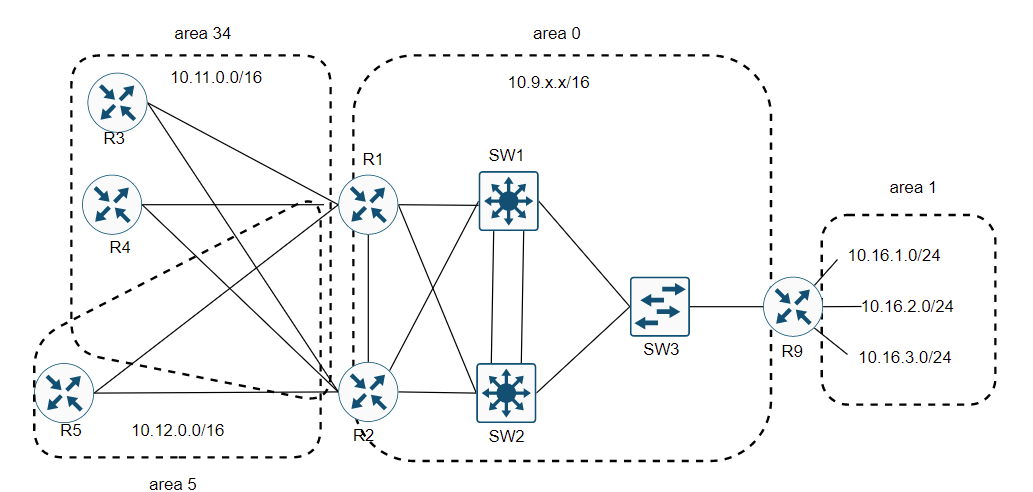
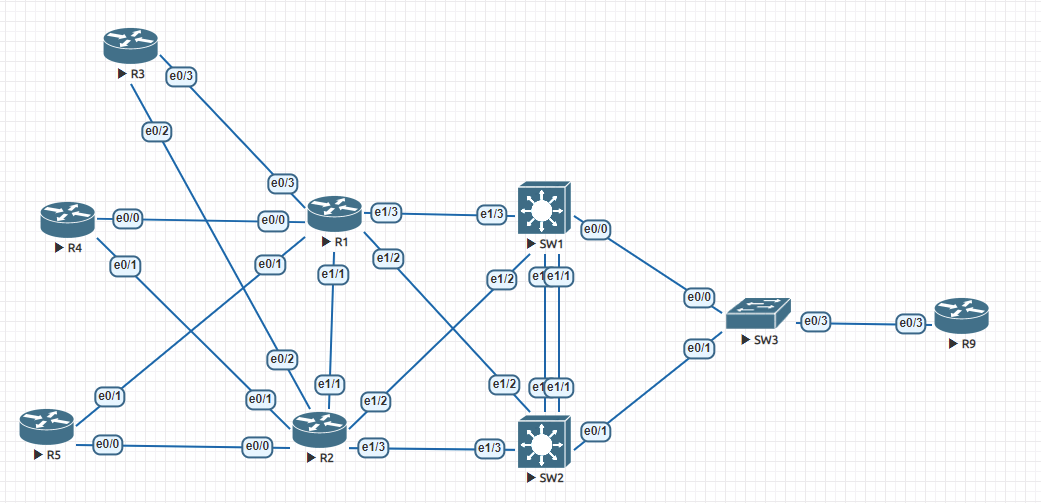
-
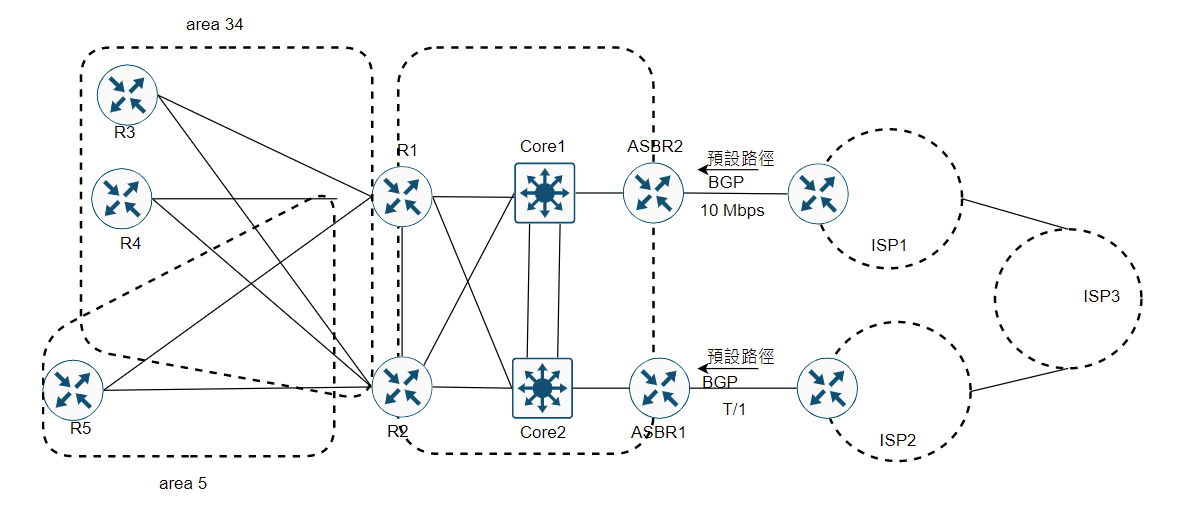
在area 34區域過濾來自R1和R2的summary LSA,過濾10.16.3.0網段的通告
R1(config)#ip prefix-list filter-into-area-34 seq 5 deny 10.16.3.0/24
R1(config)#ip prefix-list filter-into-area-34 seq 10 permit 0.0.0.0/0 le 32
!
R1(config)#router ospf 1
R1(config-router)#area 34 filter-list prefix filter-into-area-34 in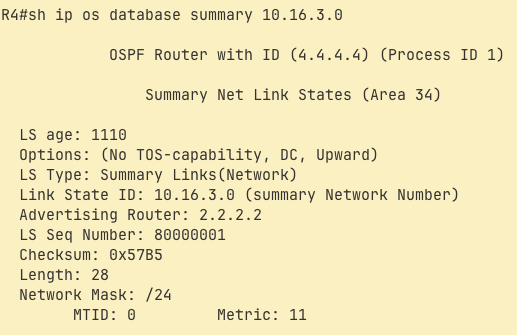
R2(config)#ip prefix-list filter-into-area-0 seq 5 deny 10.16.2.0/23 ge 24 le 24
R2(config)#ip prefix-list filter-into-arae-0 seq 10 premit 0.0.0.0/0 le 32
!
R2(config)#router ospf 1
R2(config-router)#area 34 filter-list prefix filter-ito-area-0 out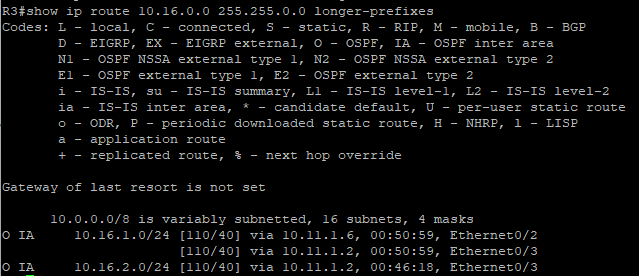

filter OSPF path 防止新增到 routing table
-
例如 area有20台router,想要過濾其中的5台router,但是使用type 3 LSA filter沒辦法達成這項功能,所以就需要利用distribute list進行過濾。
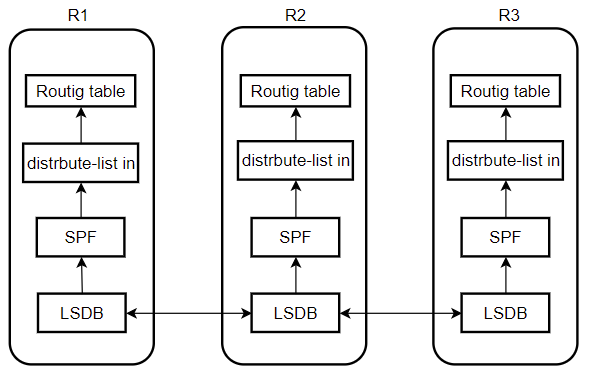
command
R1(config-router)#distribute-list prefix [perfix-list | acl | route map] {in | out}
case
-
上面一樣了topology,但是要在R3 routing table上過濾10.16.1.0/24,但是database是會有,10.16.1.0的訊息
R3(config)#ip prefix-list filter-1 seq 5 deny 10.16.1.0/24
R3(config)#ip prefix-list filter-1 seq 10 permit 0.0.0.0/0
!
R3(config)#router ospf 1
R3(config-router)#distrribute-list prefix filter-1 in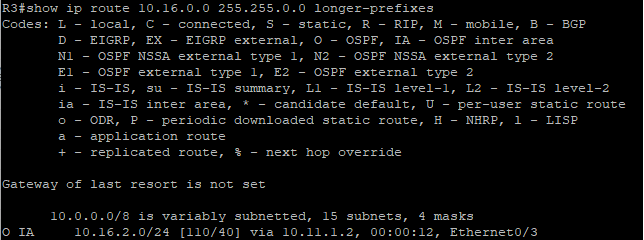

路徑彙整
ABR手動summarization
- 可能在某些ABR上需要路徑彙整,路徑彙整會帶給網路更高的效率,減少LSR和LSU交互的次數,但是如果情況不允許的話不彙整也可以。
command
area area-id range ip-address mask [advertise | not-advertise] [cost cost]
case
-
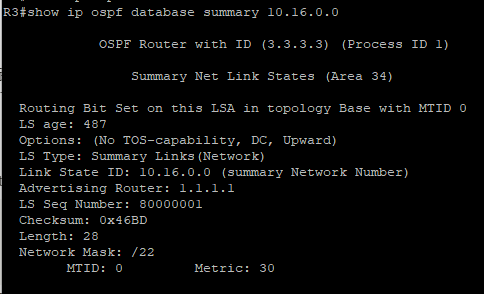
在R9上設定,與路徑篩選同樣topology
R9(config-router)#area 1 range 10.16.0.0 255.255.252.0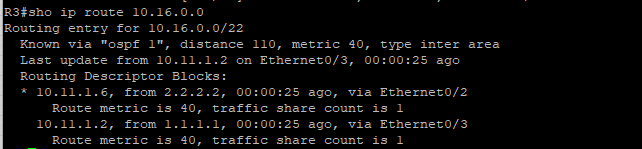
ASBR手動summarization
- 在某些情況ASBR需要路徑彙整,ABR summarization跟ASBR summariztion功能差不多,ASBR用的LSA是使用type 5 Extended LSA,ASBR會查找重分配到OSPF裡的路徑,這些路徑都是來自外部路徑來源,如果這些路徑有改動ASBR將執行路徑彙整。
- 為了建立彙總,ASBR,ASBR實際上替彙整路徑創建type 5 Extended LSA。
command
summary-address {{ip-address mask} | {prefix mask}} {not-advertise}
預設路徑
-
預設路徑可以使用很多方法達成,其中有個方法就是使用area range路徑來,在ABR1打上,area 0 range 0.0.0.0 0.0.0.0,但是有更好的工具可以使用default-information originate
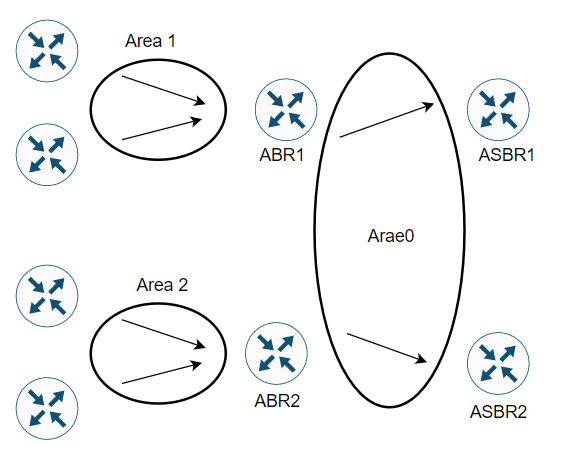
-
default-information originate的好處他是告訴其他路由器建立0.0.0.0/0 type 5 LSA,flooding告訴其他路由器,但是在設定的時候ASBR需要有一條預設路由。
-
default-information originate command
DEMO(config-router)#default-information originate [always] [metric metric-value] [metric-type type-value] [route-map map-name]- 使用預設參數OSPF會通告External LSA預設metric為1到OSPF網路中,但是該路由器需要有預設路徑
- 如果使用always參數,表示如果沒有預設路徑,也會通告預設路徑
- metric-type 定義了是否為第4或是第5 LSA
- route-map的允許動作,決定何時通告預設路徑何時移除預設路徑
OSPF末梢區域
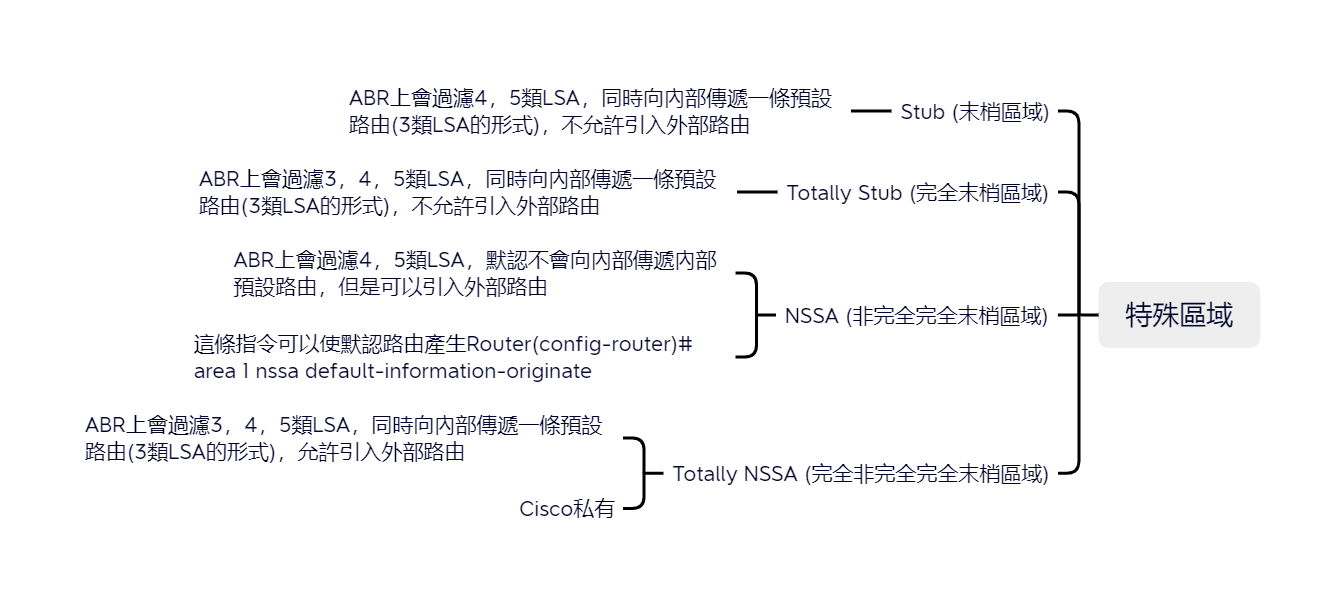
| 種類 | 會不會產生默認路由 | 允許外部路由 | 過濾LSA | 私有 |
|---|---|---|---|---|
| Stub | V | X | 4、5 | X |
| Totally Stub | V | X | 3、4、5 | X |
| NSSA | X | V | 4、5 | X |
| Totally NSSA | V | V | 3、4、5 | V |
Topology
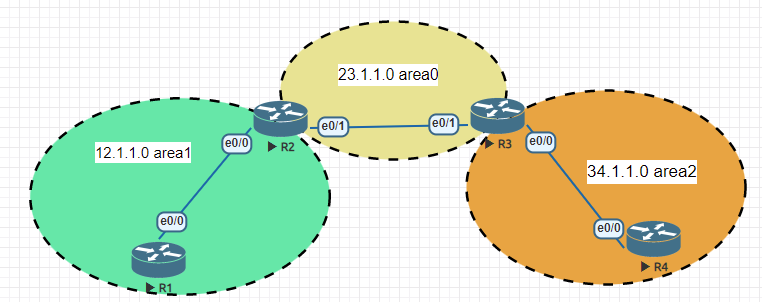
Stub (末梢區域)
R1(config)#router ospf 1
R1(config-router)#area 1 stub
R2(config)#router ospf 1
R2(config-router)#area 1 stub
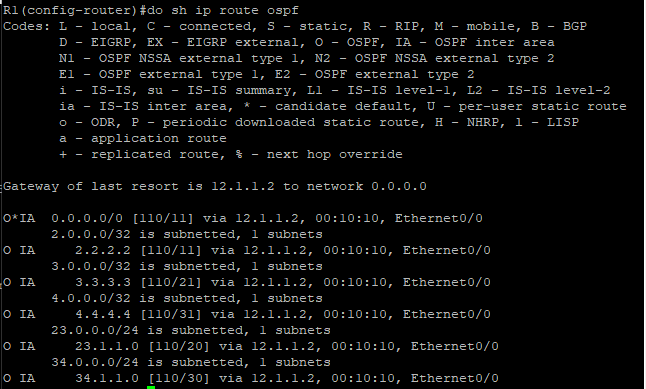

Tips :
使用 Totally Stub 或是 Stub是不能再使用外部路由的,因為沒有4、5類的LSA

Totally Stub
R1不需要,因為三類訊息是在ABR上處理的
R2(config)#router ospf 1
R2(config-router)#area 1 stub no-summary
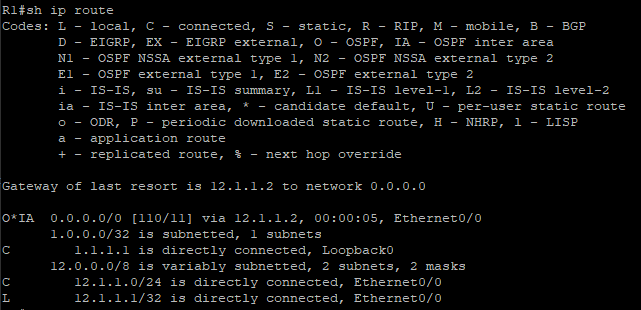
Tips : 使用 Totally Stub 或是 Stub是不能再使用外部路由的,因為沒有4、5類的LSA
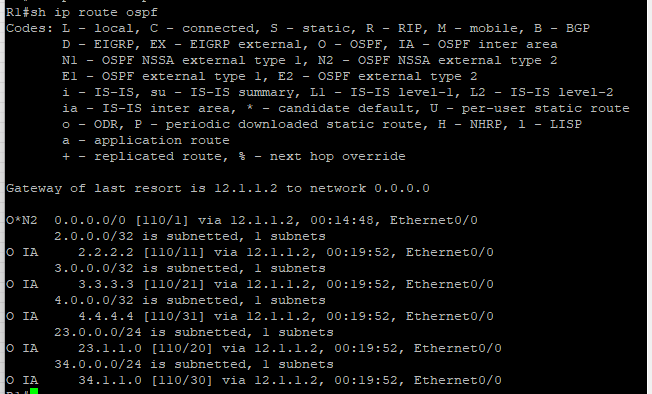
NSSA (not-so-stubby area)
跟Stub類似只是可以傳遞外部路由訊息
R1(config)#router ospf 1
R1(config-router)#no area 1 stub
R1(config-router)#area 1 nssa
R1(config-router)#area 1 nssa default-information-originate
R2(config)#router ospf 1
R2(config-router)#no area 1 stub
R2(config-router)#area 1 nssa
R2(config-router)#area 1 nssa default-information-originate
Tips :
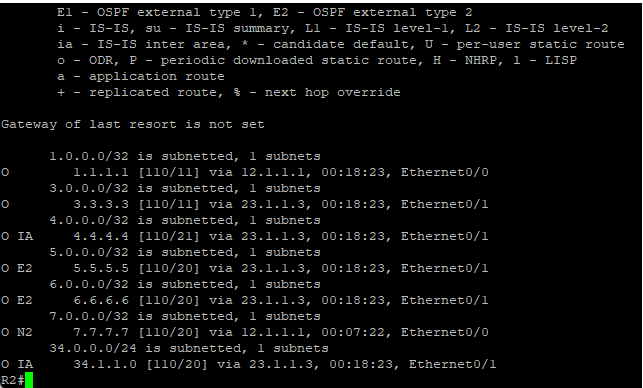
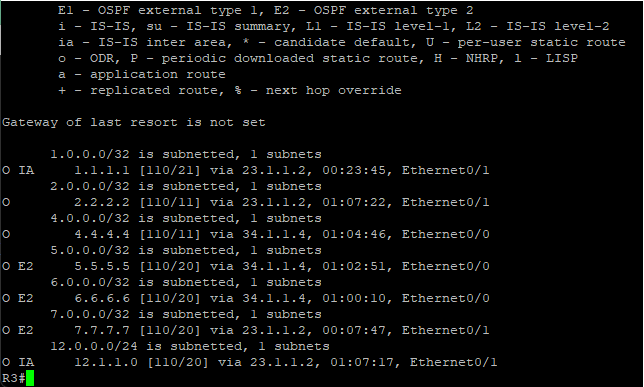
但是當我宣告外部路由的時候會出現7類LSA,但是外部不允需7類LSA,所以在ABR上會出現7類LSA轉5類LSA
R1(config)#ip route 7.7.7.7 255.255.255.255 null0
R1(config)#router ospf 1
R1(config-router)#redistribute static subnets
-
在ABR上(R2) 7.7.7.7的路由條目是N2 7類LSA
-
在R3 7.7.7.7的路由條目是E2 5類LSA
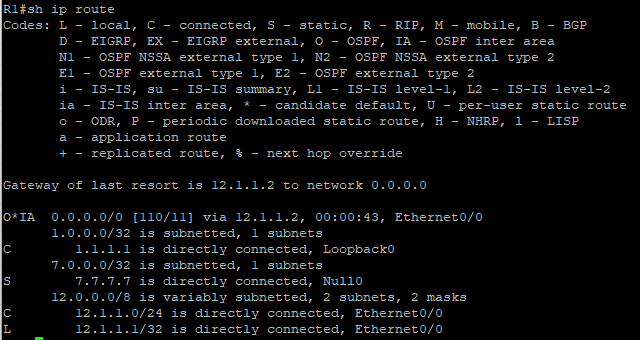
Totally NSSA
R1上可以不用動繼續使用NSSA,因為是ASBR處理三類訊息,也會自動有默認路由出現
R2(config)#router ospf 1
R2(config-router)#area 1 nssa no-summary
其他
Virtual link
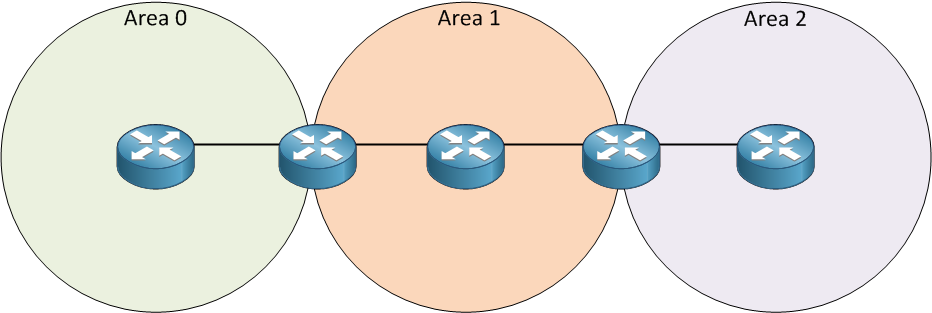
這項技術可以暫時的把未設設計好的OSPF區域,也就是說沒有連接area0的區域暫時連接起來
,也可以把兩個area0連接起來,但是建議還是需要直接連接arae0
-
case
可以看到這張圖Area2沒有連接到Area0所以在Area2這個網段的主機是無法跟其他網段的主機做通訊,所以我們就需要Virtual link這項技術
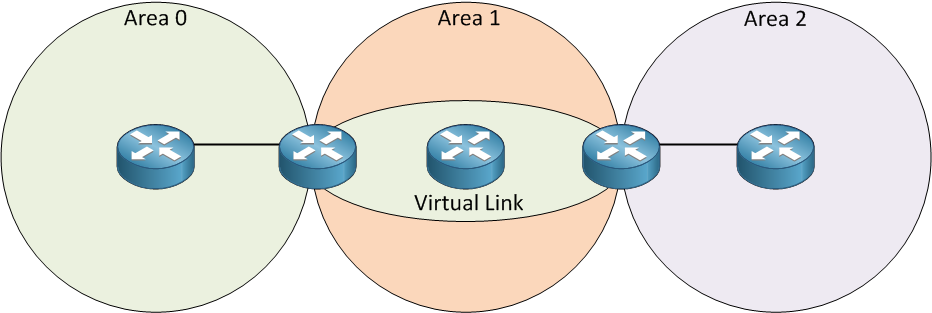
下面就是利用Virtual Link建立的虛擬鏈路這樣Area2就可以跟其他區域做通訊了
這是topology
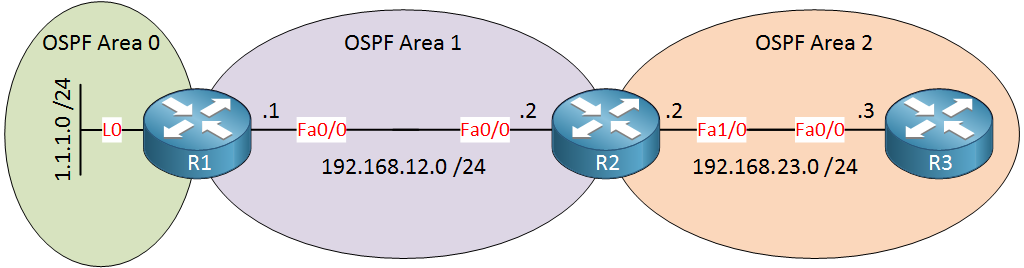
R1(config)#router ospf 1
R1(config-router)#network 1.1.1.0 0.0.0.255 area 0
R1(config-router)#network 192.168.12.0 0.0.0.255 area 1
R2(config)#router ospf 1 R2(config-router)#network 192.168.12.0 0.0.0.255 area 1 R2(config-router)#network 192.168.23.0 0.0.0.255 area 2R3(config)#router ospf 1 R3(config-router)#network 192.168.23.0 0.0.0.255 area 2R1(config)#router ospf 1 R1(config-router)#area 1 virtual-link 192.168.23.2R2(config)#router ospf 1 R2(config-router)#area 1 virtual-link 1.1.1.1最後可以使用這個指令來觀察
R1#show ip ospf virtual-links

Virtual Link OSPF_VL0 to router 192.168.23.2 is up
  Run as demand circuit
  DoNotAge LSA allowed.
  Transit area 1, via interface FastEthernet0/0, Cost of using 1
  Transmit Delay is 1 sec, State POINT_TO_POINT,
  Timer intervals configured, Hello 10, Dead 40, Wait 40, Retransmit 5
    Hello due in 00:00:06
    Adjacency State FULL (Hello suppressed)
    Index 1/2, retransmission queue length 0, number of retransmission 0
    First 0x0(0)/0x0(0) Next 0x0(0)/0x0(0)
    Last retransmission scan length is 0, maximum is 0
    Last retransmission scan time is 0 msec, maximum is 0 msec
R2#show ip ospf virtual-links Virtual Link OSPF_VL0 to router 1.1.1.1 is up Run as demand circuit DoNotAge LSA allowed. Transit area 1, via interface FastEthernet0/0, Cost of using 1 Transmit Delay is 1 sec, State POINT_TO_POINT, Timer intervals configured, Hello 10, Dead 40, Wait 40, Retransmit 5 Hello due in 00:00:05 Adjacency State FULL (Hello suppressed) Index 1/3, retransmission queue length 0, number of retransmission 0 First 0x0(0)/0x0(0) Next 0x0(0)/0x0(0) Last retransmission scan length is 0, maximum is 0 Last retransmission scan time is 0 msec, maximum is 0 msecR1#show ip ospf database OSPF Router with ID (1.1.1.1) (Process ID 1) Router Link States (Area 0) Link ID ADV Router Age Seq# Checksum Link count 1.1.1.1 1.1.1.1 189 0x80000004 0x00E333 2 192.168.23.2 192.168.23.2 1 (DNA) 0x80000002 0x009816 1R2#show ip ospf database OSPF Router with ID (192.168.23.2) (Process ID 1) Router Link States (Area 0) Link ID ADV Router Age Seq# Checksum Link count 1.1.1.1 1.1.1.1 1 (DNA) 0x80000004 0x00E333 2 192.168.23.2 192.168.23.2 159 0x80000002 0x009816 1
Max-metric
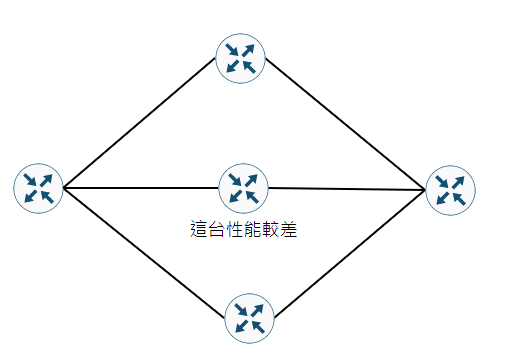
這個指令可以在性能較差的設備上使用,可以使這台路由器不承擔數據流量,但是有有備份的功能,也可以通過調整cost來達到此功能
max-mertric router-lsa
passive-interface 被動介面
OSPF啟動後,路由器會發送Hello去尋找鄰居如果不想要,發送hello封包浪費頻寬或是建立非法鄰居就可以使用被動介面。
Router(config)#passive-interface default 預設皆使用被動介面
Router(config-router)#passive-interface <interface>
Router(config-router)#no passive-interface <interface>
OSPF load balance
以下指令可以更改load balance最多的路徑預設是4條
Router(config-router)#maximum-path 6
OSPF優化
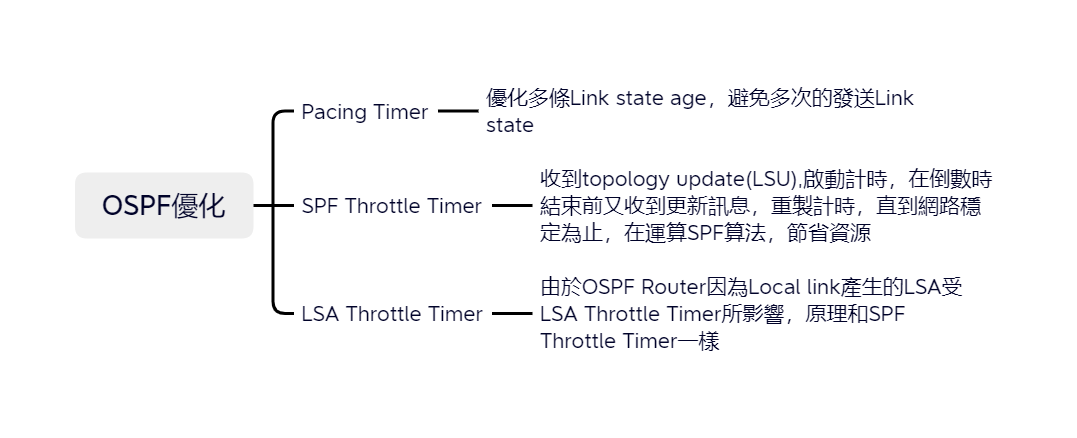
Pacing Timer
OSPF每隔1800就會把Link state重新發布,在OSPF Database裡面可以看到Link state age所以當age數到1800就要重新發布,但當Link state很多的時候一條一條處理變得很沒有效率,很耗CPU所以可以改。因此OSPF會把多條發布時間相約的link State一起處理,用Group Pacing Timer來控制。例如OSPF預設Group Pacing Timer為240秒,即是說當Link state的age數到1800 也不用立即處理,先等一下,等240秒如果再240秒內還有其他link state到期,就統一安排發布。
R1(config)#router ospf 1
R1(config)#timers pacing lsa-group 500
然後,需要重新發的Link state會被放進interface的LSA Flood List準備送出,但把LSA一個一個送出又造成很大的Overhead,所以有個interface flood pacing timer,預設33 msecs,意思是等待33 secs才發出一個update packet,每個Packet就可以包含多個LSA。
R1(config)#router ospf 1
R1(config-router)#timers pacing flood 50
發出LSA後等待對方回傳ACK表示收到LSA,如果收不到對方回應的ACK就需要重新發LSA。
retransmission pacing timer控制,retransmission pacing控制的等待時間。
R1(config)#router ospf 1
R1(config-router)#timers pacing retransmission 100
可以用show ip ospf看到timer設定
SPF Throttle Timer
-
Initial SPF schedule delay (Inital)
預設值為5,000 msecs,OSPF Router收到LSU後,會先等待相等於hold-time的時間,在這段時間內收到的Event會被收集在一起進行SPF算法。
-
Minimum hold time between two consecutive SPFs (Increment)
預設為10,000 msecs,如果LSU不斷出現,hold-time會不斷增加,第一波LSU被處理後,hold-time會變成相等於Minimum hold time between two consecutive SPFs 的值,延長hold-time是為了應付第二波可能出現更多的LSU,減少SPF運算次數。
-
Maximum wait time between two consecutive SPFs (Max wait)
如果LSU一直出現hold-time會一直被增加,hold-time2,hold-time3….以此類推,所以需要有個限制
R1(config)#router ospf 1
R1(config-router)#timers throttle spf 10000 2000 100000
可以使用 sh ip ospf | i SPF查看
LSA Throttle Timer
R1(config)#router ospf 1
R1(config-router)#timers throttle lsa 20000 30000 50000
可以使用sh ip ospf | i LSA | i msecs 查看
OSPFv3
使用OSPF實作dual stack的兩種選擇
-
可以使用dual stack意味著可以同時支援IPv4和IPv6。為了實現dual stack,每台路由器都需要學習IPv4和IPv6路徑。也就是在路由器同時運行OSPFv2和OSPFv3,也就是說OSPFv2和OSPFv3都有自己的LSDB。
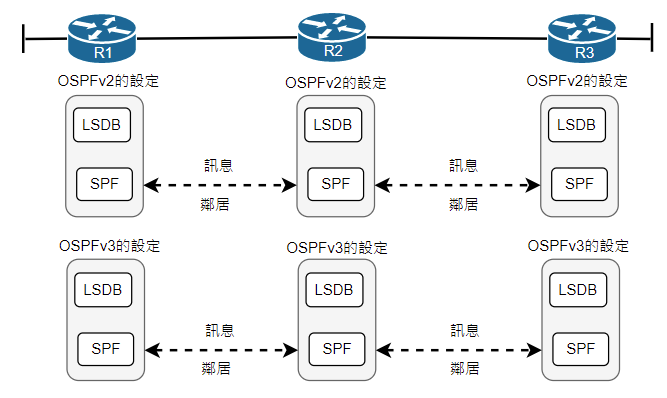
-
現在IOS已經可以僅用OSPFv3支援dual stack,並設定支援IPv6及IPv4,路由器IPv4和IPv6能有獨立的LSDB、獨立SPF運算。
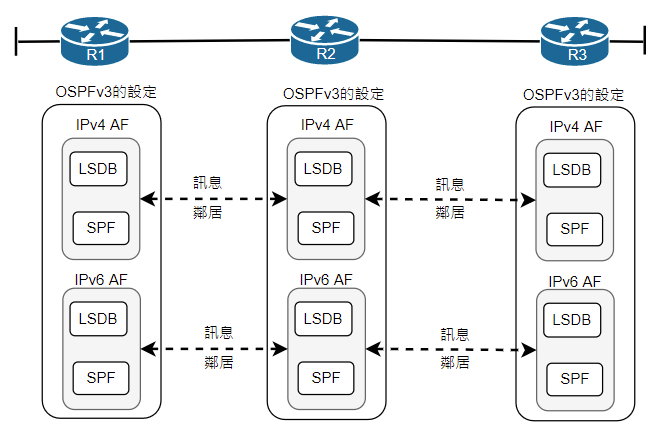
OSPFv2和OSPFv3的本質
- 兩者都是LS協定
- 兩個都使用相同的區域設計概念和設計術語
- 兩者都幽囚在介面上啟用路由協定
- 啟用在介面上,兩者嘗試探索鏈路鄰居
- 成為鄰居透過網路拓樸傳遞LSA來交換LSDB
- 交換所有LSA後,OSPFv3和OSPFv2均使用SPF算出最短路徑
- 均使用相同的權值概念(依據每個介面的介面成本)和相同的預設成本
- 均使用LSA來描述拓樸,且LSA的運作分是不太一樣
OSPFv2與OSPFv3之間的最大區別就是,OSPFv3改變了LSA的結構,增加新的LSA類型,且LSA運作方式不太一樣。
OSPFv2和OSPFv3的差別
- OSPFv3鄰居不必在同一個IPv6子網中,額OSPFv2需要在相同的IPv4子網中
- 他們在type 3 LSA有不同的稱呼,在OSPFv3中稱”跨區域首碼LSA”,OSPFv2稱”summary LSA”
- OSPFv3引進新的LSA類型
- type 1 2 3 LSA內部有不同
OSPFv3 LSA
改名的LSA
- type 3 : type 3 LSA改名為 Interarea prefix LSA for ABR。與OSPFv2一樣,負責將某個區域的內部網段通告給其他區域。LSA是由ABR建立
- type 4:正確名稱為 Inter-Area-Router-LSA,由 ABR 產生,用來向其他區域通告 ASBR 的可達資訊與成本,供接收端計算到達 ASBR 的路徑。它描述的是 ASBR,而不是外部目的網段;外部網段由 AS-External-LSA 通告。參考:RFC 5340 §4.4.3.4。
新的LSA
- type 8 : type 8名為Link LSA。僅從在本地鏈路上。路由器利用Link LSA來通告路由器的Link local address ,給相同練路上的所有其他路由器,type 8 也會提供此鏈路上所有的IPv6清單,OSPFv3也利用type 8 LSA來設定選項位元,這些位元賦予OSPFv3更多關於網路通告本質的資訊。
- type 9 : type 9名為Intra-Area Prefix LSA,能夠傳遞有關連接路由器的IPv6網路(包括末梢網路)資訊(類似 IPv4 type 1 LSA),type 9 LSA還能傳送區域內有關IPv6傳輸網路區段的資訊(類似 IPv4 type 2 LSA)
OSPFv3的設定
傳統的OSPFv3設定
- 利用ipv6 router ospf **pid,**建立OSPFv3程序編號,進入OSPF設定模式
- 確保路由器擁有自己的router-id
- 在OSPFv4設定模式下router-id id-value
- 設定loopback介面設定IPv4位址(條選所運作loopback介面最高的IPv4位址)
- 根據IPv4位址挑選所有非loopback介面最高的IPv4位址
- 在每個需要啟用OSPFv3介面上設定ipv6 ospf pid area area-number。
- 如果某些OSPFv3介面可以使用passive-interface type number將路由器的介面設定為被動介面
傳統的OSPF設定
其餘指令基本跟OSPFv2相同
R(config-if)#ipv6 osfp cost [1~65535]
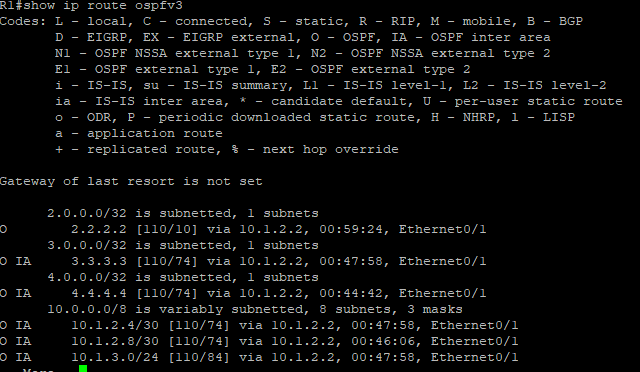
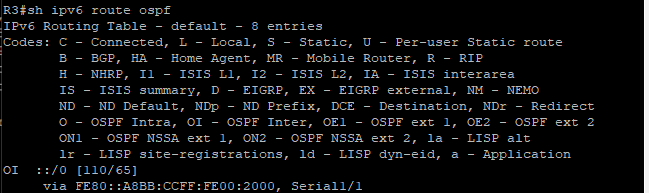
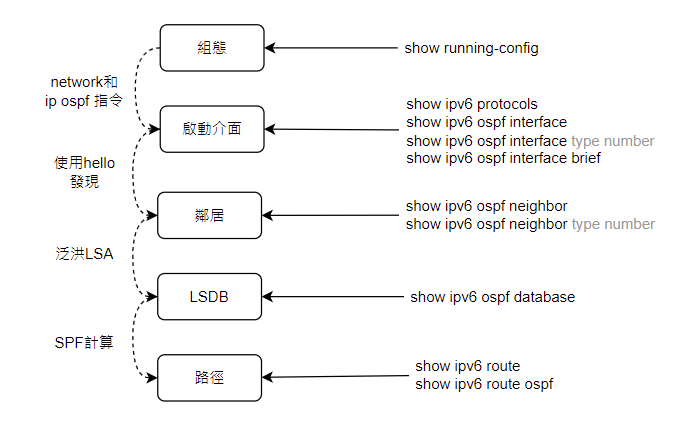
show
case
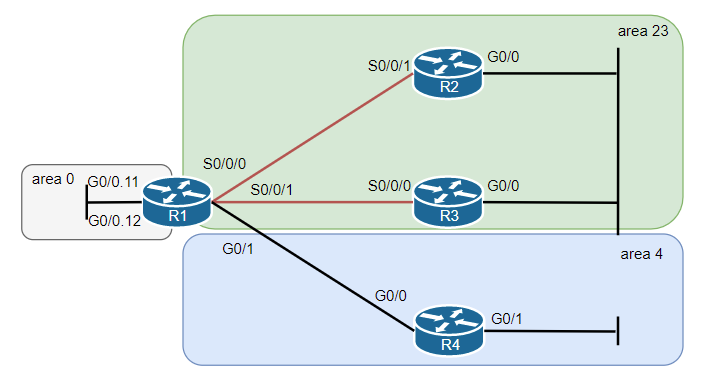
R1的設定
! config on R1
	ipv6 unicast-routing
!
interface g0/0
	mac-address 0200.0000.0001
!
interface g0/0.11
	encapsulation dot1q 11
	ipv6 address 2001:db8:1:1::1/64
	ipv6 ospf 1 area 0
!
interface g0/0.12
	encapsulation dot1q 12
	ipv6 address 2001:db8:1:2::1/64
	ipv6 ospf 1 area 0
!
interface s0/0/0
	ipv6 address 2001:db8:1:12::1/64
	ipv6 ospf 1 are 23
!
interface serial 0/0/1
	ipv6 address 2001:db8:1:13::1/64
	ipv6 ospf 1 area 23
!
ipv6 router ospf 1
	router-id 1.1.1.1
R2的設定
! config on R2
ipv6 unicast-routing
!
interface G0/0
	mac-address 0200.0000.0002
	ipv6 address 2001:db8:1:23::2/64
	ipv6 ospf 2 area 23
!
interface s0/0/1
	ipv6 address 2001:db8:1:12::2/64
	ipv6 ospf 2 area 23
!
ipv6 router ospf 2
	router-id 2.2.2.2
R3的設定
! config on R3
ipv6 unicast-routing
!
interface G0/0
	mac-address 0200.0000.0003
	ipv6 address 2001:db8:1:23::3/64
	ipv6 ospf 3 area 23
!
interface s0/0/0
	ipv6 address 2001:db8:1:13::3/64
	ipv6 ospf 3 area 23
!
ipv6 router ospf 3
	router-id 3.3.3.3
R4的設定
! config on R4
ipv6 unicast-routing
!
interface G0/0
	mac-address 0200.0000.0004
	ipv6 address 2001:db8:1:14::4/64
	ipv6 ospf 4 area 4
!
interface s0/1
	ipv6 address 2001:db8:1:4::4/64
	ipv6 ospf 4 area 4
!
ipv6 router ospf 4
	router-id 4.4.4.4
	passive-interface g0/1
OSPFv3 address family
簡介
- 此方法可同時支援 IPv4 和 IPv6;各 address family 使用各自的 OSPFv3 instance,分別維護 LSDB 並進行 SPF 計算,不是將 IPv4 與 IPv6 網路資訊混合在同一個 LSDB。參考:RFC 5838 §2.1。設定步驟如下
- router ospfv3 process-id 啟動OSPFv3繞送程序
- (非必要) router-id rid rid 指令設定RID
- address-family { ipv4 | ipv6 }指令建立IPv4和IPv6 address family
- 介面設定ospfv3 process-id { ipv4 | ipv6 } area area_number
case
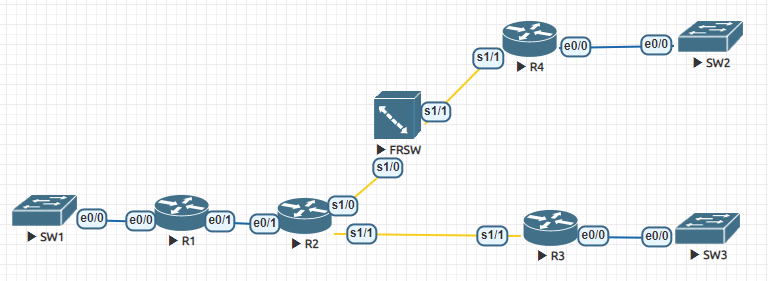
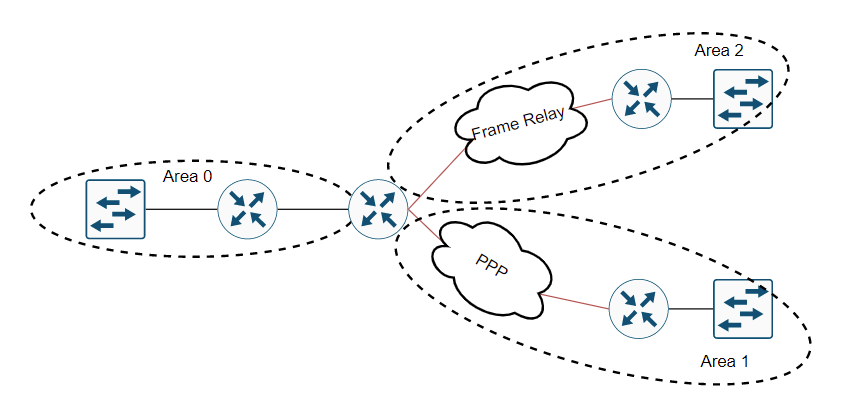
R1
interface Loopback0
 ip address 1.1.1.1 255.255.255.255
 ipv6 address 2007::1111/64
 ospfv3 1 ipv6 area 0
 ospfv3 1 ipv4 area 0
!
interface Ethernet0/0
 ip address 10.1.1.1 255.255.255.0
 ipv6 address 2001::1/64
 ospfv3 1 ipv4 area 0
 ospfv3 1 ipv6 area 0
!
interface Ethernet0/1
 ip address 10.1.2.1 255.255.255.252
 ipv6 address 2002::1/64
 ospfv3 1 ipv6 area 0
 ospfv3 1 ipv4 area 0
!
router ospfv3 1
 router-id 1.1.1.1
 !
 address-family ipv4 unicast
  passive-interface Ethernet0/0
  passive-interface Loopback0
 exit-address-family
 !
 address-family ipv6 unicast
  passive-interface Ethernet0/0
  passive-interface Loopback0
  maximum-paths 32
 exit-address-family
!
R2
interface Loopback0
 ip address 2.2.2.2 255.255.255.255
 ipv6 address 2007::2222/64
 ospfv3 1 ipv4 area 0
 ospfv3 1 ipv6 area 0
!
interface Ethernet0/0
 no ip address
 shutdown
!
interface Ethernet0/1
 ip address 10.1.2.2 255.255.255.252
 ipv6 address 2002::2/64
 ospfv3 1 ipv4 area 0
 ospfv3 1 ipv6 area 0
!
interface Ethernet0/2
 no ip address
 shutdown
!
interface Ethernet0/3
 no ip address
 shutdown
!
interface Serial1/0
 no ip address
 encapsulation frame-relay
 serial restart-delay 0
!
interface Serial1/0.204 point-to-point
 ip address 10.1.2.9 255.255.255.252
 ipv6 address 2005::1/64
 ospfv3 1 ipv4 area 1
 ospfv3 1 ipv6 area 1
 frame-relay interface-dlci 204
!
interface Serial1/1
 ip address 10.1.2.5 255.255.255.252
 encapsulation ppp
 ipv6 address 2003::1/64
 ospfv3 1 ipv6 area 2
 ospfv3 1 ipv4 area 2
 ppp chap hostname remote
 ppp chap password 0 ccnp
 serial restart-delay 0
!
interface Serial1/2
 no ip address
 shutdown
 serial restart-delay 0
!
interface Serial1/3
 no ip address
 shutdown
 serial restart-delay 0
!
router ospfv3 1
 router-id 2.2.2.2
 !
 address-family ipv4 unicast
  passive-interface Loopback0
 exit-address-family
 !
 address-family ipv6 unicast
  passive-interface Loopback0
  maximum-paths 32
  area 2 stub no-summary
 exit-address-family
!
FRSW
hostname FRSW
!
ip cef
ipv6 unicast-routing
ipv6 cef
frame-relay switching
!
interface Serial1/0
 no ip address
 encapsulation frame-relay
 serial restart-delay 0
 clock rate 64000
 frame-relay intf-type dce
 frame-relay route 204 interface Serial1/1 402
!
interface Serial1/1
 no ip address
 encapsulation frame-relay
 serial restart-delay 0
 clock rate 64000
 frame-relay intf-type dce
 frame-relay route 402 interface Serial1/0 204
!
R3
interface Loopback0
 ip address 3.3.3.3 255.255.255.255
 ipv6 address 2007::3333/64
 ospfv3 1 ipv6 area 2
 ospfv3 1 ipv4 area 2
!
interface Ethernet0/0
 ip address 10.1.3.1 255.255.255.0
 ipv6 address 2004::1/64
 ospfv3 1 ipv6 area 2
 ospfv3 1 ipv4 area 2
!
interface Ethernet0/1
 no ip address
 shutdown
!
interface Ethernet0/2
 no ip address
 shutdown
!
interface Ethernet0/3
 no ip address
 shutdown
!
interface Serial1/0
 no ip address
 shutdown
 serial restart-delay 0
!
interface Serial1/1
 ip address 10.1.2.6 255.255.255.252
 encapsulation ppp
 ipv6 address 2003::2/64
 ospfv3 1 ipv4 area 2
 ospfv3 1 ipv6 area 2
 ppp authentication chap
 serial restart-delay 0
!
interface Serial1/2
 no ip address
 shutdown
 serial restart-delay 0
!
interface Serial1/3
 no ip address
 shutdown
 serial restart-delay 0
!
router ospfv3 1
 router-id 1.1.1.1
 !
 address-family ipv4 unicast
  passive-interface Ethernet0/0
  passive-interface Loopback0
 exit-address-family
 !
 address-family ipv6 unicast
  passive-interface Ethernet0/0
  passive-interface Loopback0
  maximum-paths 32
  area 2 stub no-summary
 exit-address-family
R4
interface Loopback0
 ip address 4.4.4.4 255.255.255.255
 ipv6 address 2007::4444/64
 ospfv3 1 ipv6 area 1
 ospfv3 1 ipv4 area 1
!
interface Ethernet0/0
 ip address 10.1.4.1 255.255.255.0
 ipv6 address 2006::1/64
 ospfv3 1 ipv4 area 1
 ospfv3 1 ipv6 area 1
!
interface Ethernet0/1
 no ip address
 shutdown
!
interface Ethernet0/2
 no ip address
 shutdown
!
interface Ethernet0/3
 no ip address
 shutdown
!
interface Serial1/0
 no ip address
 shutdown
 serial restart-delay 0
!
interface Serial1/1
 no ip address
 encapsulation frame-relay
 serial restart-delay 0
!
interface Serial1/1.402 point-to-point
 ip address 10.1.2.10 255.255.255.252
 ipv6 address 2005::2/64
 ospfv3 1 ipv6 area 1
 ospfv3 1 ipv4 area 1
 frame-relay interface-dlci 402
!
interface Serial1/2
 no ip address
 shutdown
 serial restart-delay 0
!
interface Serial1/3
 no ip address
 shutdown
 serial restart-delay 0
!
router ospfv3 1
 !
 address-family ipv4 unicast
  passive-interface Ethernet0/0
  passive-interface Loopback0
 exit-address-family
 !
 address-family ipv6 unicast
  passive-interface Ethernet0/0
  passive-interface Loopback0
  area 2 stub
 exit-address-family